Introduction
Catering Management Software is a specialized platform designed to help catering businesses manage events, orders, menus, logistics, billing, and customer relationships from a single system. In simple terms, it replaces spreadsheets, manual tracking, and scattered communication with a centralized, automated workflow.
As catering operations become more complex—handling multiple events, custom menus, staffing, and last-minute changes—modern software is no longer optional. In a digital-first environment, businesses need real-time visibility, automation, and integration with accounting, CRM, and inventory systems to stay competitive.
Real-world use cases:
- Managing multiple events (weddings, corporate, private parties) simultaneously
- Tracking menu planning and ingredient requirements
- Automating quotes, invoices, and contracts
- Coordinating staff scheduling and logistics
- Maintaining customer communication and preferences
What buyers should evaluate:
- Event and order management capabilities
- Menu and inventory tracking
- Billing, invoicing, and payments
- Integration with accounting/CRM tools
- Ease of use and onboarding
- Mobile access and real-time updates
- Reporting and analytics
- Scalability for growing operations
- Security and data protection
- Customization and workflow flexibility
Best for: Catering companies, event planners, hospitality businesses, cloud kitchens, and restaurants offering catering services—from small operators to enterprise-level catering groups.
Not ideal for: Businesses with minimal catering operations or those needing only basic POS systems; simpler tools may suffice in those cases.
Key Trends in Catering Management Software
- AI-driven forecasting: Predict demand, ingredient needs, and staffing based on historical data
- Automation-first workflows: Auto-generated quotes, invoices, and event timelines
- Mobile-first operations: Real-time updates for field staff and event teams
- Integrated ecosystems: Seamless sync with accounting, CRM, and POS systems
- Cloud-native platforms: Remote access, scalability, and reduced IT overhead
- Customer experience focus: Personalized menus and communication tracking
- Subscription pricing models: SaaS-based flexible billing
- Data-driven decision making: Advanced analytics dashboards
- Compliance awareness: Food safety and operational compliance tracking
- API-first architectures: Easier integration with third-party tools
How We Selected These Tools (Methodology)
- Evaluated market adoption and brand recognition in catering and hospitality
- Assessed feature completeness across event, menu, billing, and logistics workflows
- Considered reliability and performance signals from user feedback trends
- Reviewed security posture indicators such as authentication and data protection
- Analyzed integration capabilities with accounting, CRM, and POS systems
- Included tools suitable for different business sizes (solo to enterprise)
- Balanced ease of use vs feature depth
- Considered support quality and onboarding experience
- Ensured representation of modern SaaS and scalable platforms
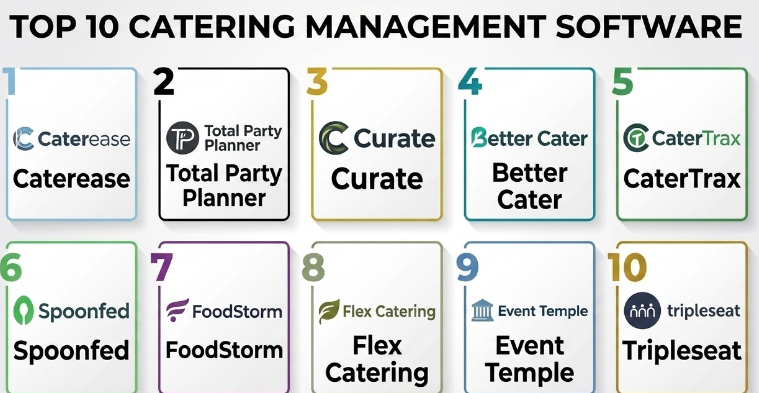
Top 10 Catering Management Software
#1 — Caterease
Short description:
Caterease is one of the most widely recognized catering management platforms, designed for event-focused businesses. It provides strong tools for managing bookings, proposals, and logistics. It is particularly suited for mid-sized to large catering operations handling complex events. Its interface focuses on workflow efficiency and event lifecycle management.
Key Features
- Event scheduling and tracking
- Proposal and contract generation
- CRM for client management
- Reporting and analytics
- Menu and package configuration
- Task and workflow automation
Pros
- Mature platform with deep catering-specific features
- Strong event workflow management
Cons
- Interface may feel dated
- Learning curve for new users
Platforms / Deployment
- Web / Windows
- Cloud / On-premise options
Security & Compliance
- RBAC, authentication controls
- Not publicly stated for certifications
Integrations & Ecosystem
Supports integration with accounting and CRM tools. Offers import/export capabilities and limited API support.
- QuickBooks
- Outlook
- Email systems
Support & Community
Established vendor with documentation and onboarding support. Community presence is moderate.
#2 — Total Party Planner
Short description:
Total Party Planner is a comprehensive catering and event management solution focused on operations and financial tracking. It caters to businesses that need strong reporting and cost control features.
Key Features
- Event management dashboard
- Costing and budgeting tools
- Proposal generation
- CRM functionality
- Financial reporting
Pros
- Strong financial visibility
- Good reporting tools
Cons
- UI can feel complex
- Setup may take time
Platforms / Deployment
- Web
- Cloud
Security & Compliance
- Basic authentication and access controls
- Not publicly stated
Integrations & Ecosystem
Integrates with accounting tools and email systems.
- QuickBooks
- Email platforms
Support & Community
Provides onboarding and training; support quality varies by plan.
#3 — Curate
Short description:
Curate is a modern catering software designed for simplicity and automation. It is ideal for small to mid-sized catering businesses looking for ease of use and a clean interface.
Key Features
- Proposal automation
- Event management
- CRM tools
- Workflow automation
- Mobile-friendly interface
Pros
- Easy to use
- Modern UI
Cons
- Limited advanced features
- Not ideal for large enterprises
Platforms / Deployment
- Web
- Cloud
Security & Compliance
- Not publicly stated
Integrations & Ecosystem
Offers integrations with common business tools.
- Accounting tools
- Email systems
Support & Community
Strong onboarding and responsive support.
#4 — Better Cater
Short description:
Better Cater focuses on simplifying catering workflows for SMBs. It offers an all-in-one solution for managing bookings, menus, and billing.
Key Features
- Event booking system
- Menu management
- Billing and invoicing
- CRM tools
- Reporting
Pros
- Affordable
- Easy to deploy
Cons
- Limited scalability
- Basic customization
Platforms / Deployment
- Web
- Cloud
Security & Compliance
- Not publicly stated
Integrations & Ecosystem
Supports integrations with accounting and communication tools.
- QuickBooks
- Email tools
Support & Community
Good customer support for SMB users.
#5 — CaterTrax
Short description:
CaterTrax is an enterprise-grade catering solution often used in large organizations such as universities and healthcare systems. It focuses on high-volume operations and automation.
Key Features
- Enterprise order management
- Menu and pricing control
- Reporting dashboards
- Workflow automation
- Multi-location support
Pros
- Highly scalable
- Strong enterprise features
Cons
- Complex implementation
- Higher cost
Platforms / Deployment
- Web
- Cloud
Security & Compliance
- Not publicly stated
Integrations & Ecosystem
Enterprise integrations with internal systems.
- ERP systems
- Payment systems
Support & Community
Enterprise-level support with onboarding assistance.
#6 — Spoonfed
Short description:
Spoonfed is a cloud-based catering software designed for flexibility and customization. It suits businesses with diverse catering needs.
Key Features
- Event management
- CRM tools
- Reporting
- Custom workflows
- Multi-event tracking
Pros
- Flexible platform
- Good customization
Cons
- UI can feel outdated
- Learning curve
Platforms / Deployment
- Web
- Cloud
Security & Compliance
- Not publicly stated
Integrations & Ecosystem
Supports integrations with accounting and CRM systems.
- QuickBooks
- CRM tools
Support & Community
Documentation available; support varies.
#7 — FoodStorm
Short description:
FoodStorm focuses on order management and multi-channel sales for catering businesses. It is suitable for businesses managing both online and offline orders.
Key Features
- Order management
- Multi-channel sales
- Inventory tracking
- Reporting
- Customer management
Pros
- Strong order tracking
- Multi-channel support
Cons
- Limited customization
- Pricing may be higher
Platforms / Deployment
- Web
- Cloud
Security & Compliance
- Not publicly stated
Integrations & Ecosystem
Integrates with POS and e-commerce platforms.
- POS systems
- Payment gateways
Support & Community
Offers onboarding and customer support.
#8 — Flex Catering
Short description:
Flex Catering is designed for event catering businesses that need flexible workflows and strong event planning tools.
Key Features
- Event planning tools
- CRM
- Billing and invoicing
- Reporting
- Workflow automation
Pros
- Flexible workflows
- Good event planning tools
Cons
- Smaller ecosystem
- Limited integrations
Platforms / Deployment
- Web
- Cloud
Security & Compliance
- Not publicly stated
Integrations & Ecosystem
Limited integrations compared to competitors.
Support & Community
Support available but limited community presence.
#9 — Event Temple
Short description:
Event Temple is a modern event management solution that includes catering features. It is ideal for venues and hospitality businesses.
Key Features
- Event booking
- CRM
- Reporting
- Workflow automation
- Venue management
Pros
- Modern UI
- Strong event management
Cons
- Not catering-focused
- Limited menu features
Platforms / Deployment
- Web
- Cloud
Security & Compliance
- Not publicly stated
Integrations & Ecosystem
Integrates with CRM and hospitality systems.
Support & Community
Strong documentation and onboarding.
#10 — Tripleseat
Short description:
Tripleseat is a widely used event management platform with catering capabilities. It is popular among restaurants and venues.
Key Features
- Event booking
- CRM
- Reporting
- Billing
- Workflow automation
Pros
- Strong adoption
- Easy to use
Cons
- Limited catering-specific features
- Pricing varies
Platforms / Deployment
- Web
- Cloud
Security & Compliance
- Not publicly stated
Integrations & Ecosystem
Supports integrations with POS and CRM systems.
Support & Community
Strong support and active user base.
Comparison Table (Top 10)
| Tool Name | Best For | Platform(s) Supported | Deployment | Standout Feature | Public Rating |
|---|---|---|---|---|---|
| Caterease | Mid-large catering | Web/Windows | Cloud/Hybrid | Event workflows | N/A |
| Total Party Planner | Financial tracking | Web | Cloud | Cost control | N/A |
| Curate | SMB catering | Web | Cloud | Ease of use | N/A |
| Better Cater | Small businesses | Web | Cloud | Simplicity | N/A |
| CaterTrax | Enterprise | Web | Cloud | Scalability | N/A |
| Spoonfed | Flexible ops | Web | Cloud | Custom workflows | N/A |
| FoodStorm | Order management | Web | Cloud | Multi-channel sales | N/A |
| Flex Catering | Event planning | Web | Cloud | Workflow flexibility | N/A |
| Event Temple | Venues | Web | Cloud | Event booking | N/A |
| Tripleseat | Restaurants | Web | Cloud | CRM integration | N/A |
Evaluation & Scoring of Catering Management Software
| Tool Name | Core (25%) | Ease (15%) | Integrations (15%) | Security (10%) | Performance (10%) | Support (10%) | Value (15%) | Weighted Total |
|---|---|---|---|---|---|---|---|---|
| Caterease | 9 | 6 | 7 | 6 | 8 | 7 | 7 | 7.5 |
| Total Party Planner | 8 | 6 | 6 | 6 | 7 | 7 | 7 | 7.0 |
| Curate | 7 | 9 | 6 | 6 | 7 | 8 | 8 | 7.5 |
| Better Cater | 6 | 8 | 5 | 6 | 7 | 7 | 8 | 7.0 |
| CaterTrax | 9 | 5 | 8 | 7 | 8 | 7 | 6 | 7.4 |
| Spoonfed | 8 | 6 | 7 | 6 | 7 | 6 | 7 | 7.0 |
| FoodStorm | 8 | 7 | 7 | 6 | 7 | 7 | 6 | 7.1 |
| Flex Catering | 7 | 7 | 5 | 6 | 7 | 6 | 7 | 6.8 |
| Event Temple | 7 | 8 | 6 | 6 | 7 | 7 | 7 | 7.1 |
| Tripleseat | 8 | 8 | 7 | 6 | 8 | 8 | 7 | 7.6 |
How to interpret scores:
- Scores are comparative across this category, not absolute
- A higher score reflects better balance across features and usability
- Enterprise tools may score lower on ease but higher on depth
- SMB tools often score higher on ease and value
- Use scores as a shortlist guide, not a final decision
Which Catering Management Software
Solo / Freelancer
Choose tools like Curate or Better Cater for simplicity and quick onboarding.
SMB
Better Cater, Curate, and Spoonfed offer a good balance of features and cost.
Mid-Market
Caterease and FoodStorm provide stronger workflow and scaling capabilities.
Enterprise
CaterTrax is best suited for large organizations with complex requirements.
Budget vs Premium
- Budget: Better Cater, Curate
- Premium: CaterTrax, Caterease
Feature Depth vs Ease of Use
- Feature depth: CaterTrax, Caterease
- Ease of use: Curate, Tripleseat
Integrations & Scalability
- Strong integrations: FoodStorm, Tripleseat
- Scalable: CaterTrax, Caterease
Security & Compliance Needs
- Enterprise-grade controls: CaterTrax
- Basic needs: Most SMB tools
Frequently Asked Questions (FAQs)
1. What is catering management software used for?
It helps manage events, orders, menus, billing, and logistics in one system, reducing manual work and improving efficiency.
2. How much does catering software cost?
Pricing varies widely, typically subscription-based. Costs depend on features, users, and scale.
3. Is it difficult to implement?
Most cloud tools are easy to set up, but enterprise solutions may require onboarding and training.
4. Can it integrate with accounting software?
Yes, many tools support integration with accounting platforms, though capabilities vary.
5. Does it support mobile access?
Most modern tools are cloud-based and mobile-friendly.
6. What are common mistakes when choosing software?
Choosing based only on price, ignoring integrations, and not testing workflows.
7. Is data secure in these systems?
Most platforms offer basic security features, but certifications vary.
8. Can I switch software later?
Yes, but data migration can be complex and should be planned carefully.
9. Does it support multi-location businesses?
Enterprise tools like CaterTrax support multi-location operations.
10. Are there alternatives?
Yes, some businesses use POS or CRM systems, but they lack catering-specific features.
Conclusion
Catering Management Software has evolved into a critical operational backbone for modern catering and event-driven businesses. From managing complex event logistics to automating billing and improving customer experience, these tools significantly reduce manual workload and operational risk. However, there is no one-size-fits-all solution. Smaller businesses may prioritize ease of use and affordability, while enterprises need scalability, integrations, and advanced workflows. The key is to align the tool with your business size, event complexity, and growth plans. As a next step, shortlist two to three tools from this list, request demos, and run a small pilot to validate real-world usability, integrations, and reporting before making a final investment decision.
