Introduction
Facility Management Software (often called FM software or IWMS – Integrated Workplace Management Systems) helps organizations manage buildings, assets, maintenance, space utilization, and workplace services from a single platform. Instead of relying on spreadsheets or disconnected tools, teams can track maintenance requests, monitor assets, manage vendors, and optimize facility performance in real time.
In today’s environment, where hybrid work, sustainability, and cost efficiency are critical, facility management software has become essential. Organizations are expected to manage smarter workplaces, reduce downtime, and ensure compliance—all while keeping operational costs under control.
Common use cases include:
- Managing preventive and reactive maintenance
- Tracking asset lifecycle and equipment health
- Space planning and occupancy management
- Vendor and service contract management
- Workplace experience (desk booking, visitor management)
What buyers should evaluate:
- Ease of use and onboarding
- Asset and maintenance management depth
- Integration capabilities (ERP, IoT, HR systems)
- Reporting and analytics features
- Mobile accessibility for field teams
- Security and compliance readiness
- Scalability for multi-location operations
- Automation and AI capabilities
Best for: Facility managers, operations leaders, IT admins, real estate teams, and enterprises managing offices, campuses, factories, hospitals, or retail chains.
Not ideal for: Very small teams with minimal assets or those needing only basic task tracking—simple project management or ticketing tools may suffice in such cases.
Key Trends in Facility Management Software
- AI-driven predictive maintenance: Systems now use sensor data and AI to predict failures before they occur.
- IoT integration: Real-time monitoring of HVAC, lighting, and equipment is becoming standard.
- Hybrid workplace support: Desk booking, occupancy analytics, and flexible workspace tools are integrated.
- Mobile-first design: Field technicians rely heavily on mobile apps for updates and task management.
- Sustainability tracking: Carbon footprint, energy usage, and ESG reporting are built into platforms.
- Automation workflows: Automated work orders, approvals, and alerts reduce manual effort.
- Cloud-first deployment: SaaS models dominate, offering scalability and lower infrastructure overhead.
- API-first ecosystems: Seamless integrations with ERP, HR, and building management systems.
- Role-based dashboards: Personalized views for facility managers, executives, and technicians.
- Outcome-based pricing: Subscription models aligned with usage, assets, or square footage.
How We Selected These Tools (Methodology)
- Evaluated market adoption and enterprise usage
- Assessed feature completeness across maintenance, assets, and space management
- Reviewed platform reliability and scalability signals
- Considered security capabilities and compliance readiness
- Analyzed integration ecosystems and extensibility
- Compared ease of use and onboarding experience
- Ensured coverage across SMB to enterprise segments
- Included modern capabilities like AI, IoT, and automation
- Balanced global vendors and widely trusted platforms
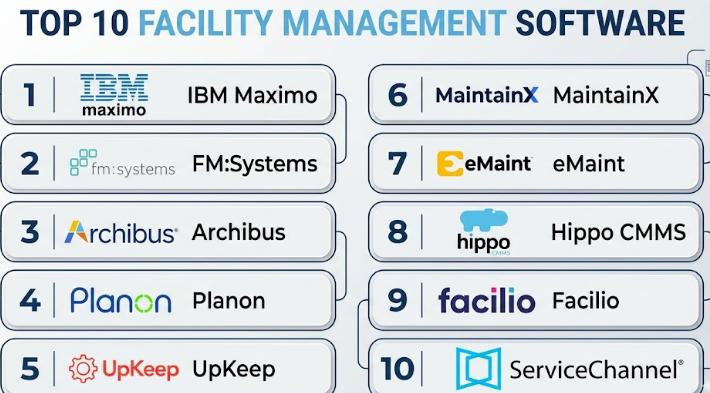
Top 10 Facility Management Software
#1 — IBM Maximo
Short description:
IBM Maximo is a comprehensive enterprise asset management and facility management platform designed for large organizations. It focuses heavily on asset lifecycle management, predictive maintenance, and IoT-driven insights. It is widely used in industries like manufacturing, energy, and transportation. Maximo is best suited for enterprises with complex infrastructure. Its strength lies in deep analytics and scalability. However, it requires skilled implementation.
Key Features
- Asset lifecycle management
- Predictive maintenance with AI
- IoT integration capabilities
- Work order automation
- Advanced analytics and reporting
- Mobile workforce tools
Pros
- Extremely powerful for large-scale operations
- Strong AI and predictive capabilities
Cons
- Complex setup and configuration
- High cost for smaller businesses
Platforms / Deployment
Web / Mobile
Cloud / Hybrid
Security & Compliance
RBAC, encryption, audit logs
Compliance: Not publicly stated
Integrations & Ecosystem
Strong enterprise ecosystem with APIs and integrations into ERP and IoT systems.
- SAP
- Oracle systems
- IoT sensors
- Custom APIs
Support & Community
Enterprise-grade support with extensive documentation and global community presence.
#2 — FM:Systems
Short description:
FM:Systems focuses on workplace management, space planning, and facility analytics. It is ideal for organizations optimizing office utilization and hybrid work environments. The platform provides detailed occupancy insights and planning tools. It suits mid-market to enterprise users. Strong reporting makes it valuable for real estate decisions.
Key Features
- Space management
- Occupancy analytics
- Workplace planning tools
- Asset tracking
- Reporting dashboards
Pros
- Strong workplace analytics
- Good visualization tools
Cons
- Limited maintenance features
- Can be complex for new users
Platforms / Deployment
Web
Cloud
Security & Compliance
Not publicly stated
Integrations & Ecosystem
Supports workplace and HR system integrations.
- HR systems
- CAD tools
- APIs
Support & Community
Professional support; documentation is solid but less community-driven.
#3 — Archibus
Short description:
Archibus is a well-known IWMS platform offering facility, space, and asset management capabilities. It is highly configurable and suitable for large enterprises. The platform covers maintenance, sustainability, and real estate management. It is widely used across industries. Its flexibility is a major advantage.
Key Features
- Facility and asset management
- Space planning
- Sustainability tracking
- Lease management
- Maintenance workflows
Pros
- Highly customizable
- Broad feature coverage
Cons
- Steep learning curve
- Requires implementation expertise
Platforms / Deployment
Web
Cloud / On-premise
Security & Compliance
RBAC, audit logs
Compliance: Not publicly stated
Integrations & Ecosystem
Extensive integration capabilities.
- ERP systems
- CAD/BIM tools
- APIs
Support & Community
Strong enterprise support; implementation partners available.
#4 — Planon
Short description:
Planon is a global IWMS platform designed for smart building and workplace management. It combines facility operations with sustainability tracking. The platform is suitable for large organizations managing multiple sites. It emphasizes digital transformation and automation.
Key Features
- Smart building management
- Maintenance automation
- Sustainability tracking
- Asset management
- IoT integration
Pros
- Strong sustainability features
- Good scalability
Cons
- Implementation complexity
- Premium pricing
Platforms / Deployment
Web / Mobile
Cloud
Security & Compliance
Not publicly stated
Integrations & Ecosystem
Strong enterprise integrations.
- IoT platforms
- ERP systems
- APIs
Support & Community
Enterprise-level support with onboarding services.
#5 — UpKeep
Short description:
UpKeep is a mobile-first CMMS platform designed for maintenance teams. It is simple, intuitive, and ideal for SMBs. It focuses on work order management and asset tracking. The platform is widely adopted for ease of use. It suits teams needing quick deployment.
Key Features
- Work order management
- Asset tracking
- Mobile app
- Preventive maintenance
- Inventory management
Pros
- Easy to use
- Quick setup
Cons
- Limited enterprise features
- Basic analytics
Platforms / Deployment
Web / iOS / Android
Cloud
Security & Compliance
MFA, RBAC
Compliance: Not publicly stated
Integrations & Ecosystem
Supports integrations with common tools.
- Slack
- Zapier
- APIs
Support & Community
Good documentation and responsive support.
#6 — MaintainX
Short description:
MaintainX is a modern CMMS platform designed for maintenance and operations teams. It emphasizes simplicity and collaboration. The platform offers real-time communication features and strong mobile usability. It is popular among SMBs and mid-market companies.
Key Features
- Work order management
- Team collaboration tools
- Preventive maintenance
- Mobile-first interface
- Reporting dashboards
Pros
- Excellent mobile experience
- Easy collaboration
Cons
- Limited advanced features
- Scaling limitations for large enterprises
Platforms / Deployment
Web / Mobile
Cloud
Security & Compliance
Not publicly stated
Integrations & Ecosystem
Growing integration ecosystem.
- APIs
- Third-party tools
Support & Community
Strong support with growing user base.
#7 — eMaint (Fluke)
Short description:
eMaint is a robust CMMS solution offering maintenance and asset management capabilities. It is flexible and scalable for mid-market and enterprise organizations. The platform supports advanced reporting and customization. It is widely used across industries.
Key Features
- Maintenance management
- Asset tracking
- Reporting tools
- Workflow automation
- Inventory management
Pros
- Strong reporting
- Flexible customization
Cons
- UI can feel outdated
- Learning curve
Platforms / Deployment
Web / Mobile
Cloud
Security & Compliance
Not publicly stated
Integrations & Ecosystem
Supports enterprise integrations.
- ERP systems
- APIs
Support & Community
Good support and training resources.
#8 — Hippo CMMS
Short description:
Hippo CMMS is a user-friendly maintenance management tool designed for smaller organizations. It focuses on ease of use and quick adoption. It is suitable for teams transitioning from spreadsheets. The platform offers essential maintenance features.
Key Features
- Work order management
- Asset tracking
- Preventive maintenance
- Reporting
- Mobile access
Pros
- Simple interface
- Affordable
Cons
- Limited advanced capabilities
- Not ideal for large enterprises
Platforms / Deployment
Web
Cloud
Security & Compliance
Not publicly stated
Integrations & Ecosystem
Limited integrations.
- Basic APIs
Support & Community
Good onboarding support for SMBs.
#9 — Facilio
Short description:
Facilio is a modern facility management platform focusing on real-time building operations. It leverages IoT and AI for smart building management. It is ideal for enterprises aiming for digital transformation. The platform integrates with building systems.
Key Features
- IoT-based monitoring
- Predictive maintenance
- Energy management
- Asset tracking
- Real-time dashboards
Pros
- Strong IoT capabilities
- Modern interface
Cons
- Requires IoT setup
- Higher complexity
Platforms / Deployment
Web
Cloud
Security & Compliance
Not publicly stated
Integrations & Ecosystem
Strong IoT integrations.
- Building systems
- APIs
Support & Community
Enterprise support with onboarding assistance.
#10 — ServiceChannel
Short description:
ServiceChannel is designed for facilities maintenance and vendor management. It is widely used in retail and multi-location businesses. The platform focuses on contractor coordination and cost control. It offers strong reporting and analytics.
Key Features
- Vendor management
- Work order tracking
- Invoice management
- Analytics
- Compliance tracking
Pros
- Strong vendor management
- Good reporting tools
Cons
- Limited customization
- Pricing not transparent
Platforms / Deployment
Web / Mobile
Cloud
Security & Compliance
Not publicly stated
Integrations & Ecosystem
Supports integrations with enterprise systems.
- ERP
- APIs
Support & Community
Strong enterprise support.
Comparison Table (Top 10)
| Tool Name | Best For | Platform(s) Supported | Deployment | Standout Feature | Public Rating |
|---|---|---|---|---|---|
| IBM Maximo | Large enterprises | Web, Mobile | Hybrid | AI predictive maintenance | N/A |
| FM:Systems | Workplace analytics | Web | Cloud | Space optimization | N/A |
| Archibus | Enterprise IWMS | Web | Hybrid | Customization | N/A |
| Planon | Smart buildings | Web, Mobile | Cloud | Sustainability tracking | N/A |
| UpKeep | SMB maintenance | Web, Mobile | Cloud | Mobile-first design | N/A |
| MaintainX | SMB teams | Web, Mobile | Cloud | Collaboration features | N/A |
| eMaint | Mid-market | Web, Mobile | Cloud | Reporting flexibility | N/A |
| Hippo CMMS | Small teams | Web | Cloud | Ease of use | N/A |
| Facilio | Smart facilities | Web | Cloud | IoT integration | N/A |
| ServiceChannel | Multi-location ops | Web, Mobile | Cloud | Vendor management | N/A |
Evaluation & Scoring of Facility Management Software
| Tool Name | Core (25%) | Ease (15%) | Integrations (15%) | Security (10%) | Performance (10%) | Support (10%) | Value (15%) | Weighted Total |
|---|---|---|---|---|---|---|---|---|
| IBM Maximo | 9 | 6 | 9 | 8 | 9 | 9 | 6 | 8.1 |
| FM:Systems | 7 | 7 | 7 | 7 | 8 | 7 | 7 | 7.2 |
| Archibus | 9 | 6 | 8 | 8 | 8 | 8 | 7 | 7.9 |
| Planon | 8 | 7 | 8 | 7 | 8 | 8 | 7 | 7.7 |
| UpKeep | 7 | 9 | 7 | 7 | 8 | 8 | 9 | 7.9 |
| MaintainX | 7 | 9 | 6 | 7 | 7 | 8 | 9 | 7.8 |
| eMaint | 8 | 7 | 8 | 7 | 8 | 8 | 7 | 7.6 |
| Hippo CMMS | 6 | 8 | 5 | 6 | 7 | 7 | 8 | 6.8 |
| Facilio | 8 | 7 | 8 | 7 | 8 | 8 | 7 | 7.7 |
| ServiceChannel | 8 | 7 | 7 | 7 | 8 | 8 | 7 | 7.6 |
How to interpret the scores:
- Scores are comparative across this list, not absolute.
- Higher “Core” reflects deeper feature sets.
- “Ease” favors SMB-friendly tools.
- “Value” balances pricing vs capability.
- Enterprise tools often score lower on ease but higher on power.
Which Facility Management Software
Solo / Freelancer
Lightweight tools like UpKeep or MaintainX are ideal. They are easy to deploy and require minimal setup.
SMB
MaintainX, UpKeep, and Hippo CMMS provide a balance of usability and functionality.
Mid-Market
eMaint and FM:Systems offer scalability with better reporting and integrations.
Enterprise
IBM Maximo, Archibus, and Planon are best for complex, multi-location operations.
Budget vs Premium
- Budget: Hippo CMMS, MaintainX
- Premium: IBM Maximo, Planon
Feature Depth vs Ease of Use
- Deep features: Maximo, Archibus
- Ease of use: UpKeep, MaintainX
Integrations & Scalability
Choose tools with strong APIs and ERP integrations for long-term growth.
Security & Compliance Needs
Enterprises should prioritize tools with strong RBAC, audit logs, and compliance support.
Frequently Asked Questions (FAQs)
1. What is Facility Management Software used for?
It helps manage buildings, assets, maintenance tasks, and workplace operations. Organizations use it to streamline operations, reduce downtime, and improve efficiency.
2. How much does facility management software cost?
Pricing varies widely based on features, users, and deployment. Most tools follow subscription models, often based on assets or users.
3. Is cloud-based FM software better than on-premise?
Cloud solutions offer scalability and lower maintenance. On-premise may suit organizations with strict data control requirements.
4. How long does implementation take?
Implementation can take from a few days for SMB tools to several months for enterprise platforms.
5. Can FM software integrate with IoT devices?
Yes, many modern platforms support IoT integration for real-time monitoring and predictive maintenance.
6. What are common mistakes when choosing FM software?
Choosing overly complex tools, ignoring integration needs, and underestimating training requirements.
7. Is FM software secure?
Most platforms include security features like RBAC, encryption, and audit logs, though compliance levels vary.
8. Can small businesses use FM software?
Yes, many tools are designed specifically for SMBs with simple interfaces and affordable pricing.
9. How does FM software improve efficiency?
It automates workflows, centralizes data, and reduces manual processes, leading to faster decision-making.
10. Can I switch FM software later?
Yes, but data migration and training must be planned carefully to avoid disruption.
Conclusion
Facility management software has evolved from simple maintenance tracking tools into powerful platforms that drive operational efficiency, sustainability, and workplace optimization. The right solution depends heavily on your organization’s size, complexity, and long-term goals. While enterprise platforms like IBM Maximo and Archibus offer unmatched depth and scalability, SMB-focused tools like MaintainX and UpKeep deliver speed and simplicity. The key is to align features with real operational needs rather than chasing the most advanced option. As a next step, shortlist two or three tools that match your requirements, run a pilot with real workflows, and validate integrations, usability, and reporting before making a final decision.
