Introduction
Event Management Software (EMS) is a digital platform designed to plan, organize, manage, and analyze events—from small webinars to large-scale conferences and hybrid experiences. It centralizes tasks such as registration, ticketing, attendee engagement, communication, logistics, and post-event analytics into one system.
In today’s digital-first world, events are no longer just physical gatherings. Hybrid and virtual formats have become mainstream, requiring tools that can manage both in-person and online experiences seamlessly. Businesses now rely on EMS to deliver scalable, data-driven, and personalized event experiences.
Real-world use cases:
- Corporate conferences and trade shows
- Virtual webinars and training sessions
- Product launches and marketing campaigns
- Community meetups and networking events
- Educational workshops and certification programs
What buyers should evaluate:
- Ease of use and onboarding
- Registration and ticketing capabilities
- Virtual/hybrid event support
- Integration with CRM and marketing tools
- Analytics and reporting
- Scalability for large events
- Security and compliance
- Customization and branding options
- Pricing flexibility
Best for: Event planners, marketing teams, HR professionals, training organizations, enterprises, and agencies managing events at scale.
Not ideal for: Individuals hosting occasional small gatherings or simple RSVP-based events—basic tools or spreadsheets may be sufficient.
Key Trends in Event Management Software
- AI-powered event planning: Automated scheduling, attendee recommendations, and predictive analytics
- Hybrid-first platforms: Seamless integration of physical and virtual event experiences
- Personalization at scale: Tailored agendas, networking suggestions, and content delivery
- Advanced analytics: Real-time dashboards for attendee behavior and ROI tracking
- Automation workflows: Email campaigns, reminders, and follow-ups automated end-to-end
- Mobile-first engagement: Dedicated event apps with live updates and networking features
- Data privacy & compliance: Increased focus on GDPR and enterprise-grade security
- Integration ecosystems: Deep connectivity with CRM, marketing automation, and payment systems
- Flexible pricing models: Subscription-based and pay-per-event pricing options
How We Selected These Tools (Methodology)
- Evaluated market adoption and brand recognition across industries
- Assessed feature completeness for end-to-end event lifecycle management
- Reviewed performance and scalability for large and hybrid events
- Considered security posture and compliance readiness
- Analyzed integration capabilities with CRM, marketing, and payment systems
- Checked customer fit across SMB, mid-market, and enterprise segments
- Evaluated ease of use and onboarding experience
- Considered support quality and documentation availability
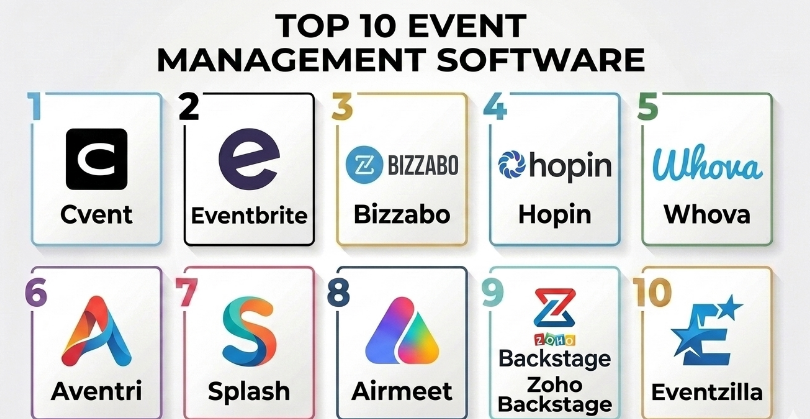
Top 10 Event Management Software
#1 — Cvent
Short description (5-6 lines):
Cvent is a leading enterprise-grade event management platform used globally for large conferences, trade shows, and corporate events. It offers comprehensive tools for registration, venue sourcing, attendee engagement, and analytics. Designed for scalability, Cvent supports complex workflows and integrations. It is widely adopted by enterprises and event agencies managing high-volume events.
Key Features
- Advanced event registration and ticketing
- Venue sourcing and management tools
- Attendee engagement and networking
- Real-time analytics and reporting
- Mobile event apps
- Marketing automation tools
Pros
- Highly scalable for large events
- Strong analytics and reporting
Cons
- Complex setup for beginners
- Higher pricing compared to SMB tools
Platforms / Deployment
Web / iOS / Android
Cloud
Security & Compliance
SSO, RBAC, encryption
Not publicly stated for certifications
Integrations & Ecosystem
Cvent integrates with CRM systems, marketing tools, and payment gateways.
- Salesforce
- Marketo
- HubSpot
- Payment processors
Support & Community
Strong enterprise support with onboarding assistance and documentation.
#2 — Eventbrite
Short description (5-6 lines):
Eventbrite is a widely used platform for ticketing and event promotion. It caters to small to mid-sized events and is popular among creators, communities, and SMBs. The platform is known for its simplicity and ease of use.
Key Features
- Ticketing and registration
- Event promotion tools
- Payment processing
- Analytics dashboard
- Mobile app support
Pros
- Easy to use
- Strong event discovery features
Cons
- Limited enterprise capabilities
- Transaction fees may add up
Platforms / Deployment
Web / iOS / Android
Cloud
Security & Compliance
Not publicly stated
Integrations & Ecosystem
- Social media platforms
- Payment gateways
- Email marketing tools
Support & Community
Good documentation; support varies by plan.
#3 — Bizzabo
Short description (5-6 lines):
Bizzabo focuses on event experience and engagement, especially for hybrid and virtual events. It offers tools for networking, content delivery, and analytics, making it popular among marketing teams.
Key Features
- Hybrid event management
- Audience engagement tools
- Event analytics
- Branding customization
- Virtual event platform
Pros
- Strong hybrid event capabilities
- Excellent user experience
Cons
- Pricing may be high
- Learning curve for advanced features
Platforms / Deployment
Web / Mobile
Cloud
Security & Compliance
Not publicly stated
Integrations & Ecosystem
- CRM systems
- Marketing tools
- Analytics platforms
Support & Community
Good onboarding and enterprise support.
#4 — Hopin
Short description (5-6 lines):
Hopin is a virtual-first event platform designed for online and hybrid events. It provides interactive features like stages, networking, and breakout sessions.
Key Features
- Virtual event hosting
- Networking and chat
- Live streaming
- Ticketing and registration
- Analytics
Pros
- Excellent for virtual events
- Interactive features
Cons
- Limited offline event support
- Pricing structure varies
Platforms / Deployment
Web
Cloud
Security & Compliance
Not publicly stated
Integrations & Ecosystem
- Streaming tools
- CRM systems
- Marketing platforms
Support & Community
Decent support; documentation available.
#5 — Whova
Short description (5-6 lines):
Whova is known for its strong attendee engagement features and mobile app capabilities. It is widely used for conferences and academic events.
Key Features
- Mobile event app
- Networking tools
- Agenda management
- Engagement features
- Analytics
Pros
- Strong engagement tools
- Easy-to-use interface
Cons
- Limited customization
- Pricing not transparent
Platforms / Deployment
Web / Mobile
Cloud
Security & Compliance
Not publicly stated
Integrations & Ecosystem
- CRM tools
- Social media
- Email platforms
Support & Community
Responsive support and onboarding.
#6 — Aventri
Short description (5-6 lines):
Aventri is an enterprise-level event management solution offering robust tools for planning, marketing, and analytics.
Key Features
- Event planning tools
- Registration management
- Marketing automation
- Analytics dashboard
- Venue management
Pros
- Comprehensive feature set
- Enterprise scalability
Cons
- Complex interface
- Higher cost
Platforms / Deployment
Web
Cloud
Security & Compliance
Not publicly stated
Integrations & Ecosystem
- CRM
- Marketing tools
- Payment systems
Support & Community
Strong enterprise support.
#7 — Splash
Short description (5-6 lines):
Splash focuses on event marketing and brand experience. It is ideal for companies looking to create branded event pages and campaigns.
Key Features
- Event page builder
- Marketing tools
- Analytics
- Email campaigns
- Branding customization
Pros
- Strong branding features
- Marketing-focused
Cons
- Limited event logistics tools
- Not ideal for large events
Platforms / Deployment
Web
Cloud
Security & Compliance
Not publicly stated
Integrations & Ecosystem
- CRM tools
- Email platforms
- Analytics tools
Support & Community
Good support for marketing teams.
#8 — Airmeet
Short description (5-6 lines):
Airmeet is a virtual and hybrid event platform designed for community engagement and networking.
Key Features
- Virtual event hosting
- Networking lounges
- Live sessions
- Analytics
- Community features
Pros
- Strong networking experience
- Easy setup
Cons
- Limited offline features
- Scaling may require upgrades
Platforms / Deployment
Web
Cloud
Security & Compliance
Not publicly stated
Integrations & Ecosystem
- CRM
- Marketing tools
- Streaming services
Support & Community
Active support and growing community.
#9 — Zoho Backstage
Short description (5-6 lines):
Zoho Backstage is part of the Zoho ecosystem, offering event management tools for SMBs with strong integration capabilities.
Key Features
- Event planning
- Ticketing
- Agenda management
- Analytics
- Mobile app
Pros
- Affordable pricing
- Strong integration with Zoho suite
Cons
- Limited advanced features
- Best within Zoho ecosystem
Platforms / Deployment
Web / Mobile
Cloud
Security & Compliance
Not publicly stated
Integrations & Ecosystem
- Zoho CRM
- Zoho Campaigns
- Payment tools
Support & Community
Good support for SMB users.
#10 — Eventzilla
Short description (5-6 lines):
Eventzilla is a flexible event management tool for small to mid-sized events, offering ticketing and registration features.
Key Features
- Ticketing system
- Registration forms
- Payment processing
- Analytics
- Event promotion
Pros
- Affordable
- Easy setup
Cons
- Limited advanced features
- Basic analytics
Platforms / Deployment
Web
Cloud
Security & Compliance
Not publicly stated
Integrations & Ecosystem
- Payment gateways
- Email tools
- CRM
Support & Community
Basic support and documentation.
Comparison Table (Top 10)
| Tool Name | Best For | Platform(s) Supported | Deployment | Standout Feature | Public Rating |
|---|---|---|---|---|---|
| Cvent | Enterprise events | Web/Mobile | Cloud | Venue sourcing | N/A |
| Eventbrite | SMB events | Web/Mobile | Cloud | Event discovery | N/A |
| Bizzabo | Hybrid events | Web/Mobile | Cloud | Engagement tools | N/A |
| Hopin | Virtual events | Web | Cloud | Live streaming | N/A |
| Whova | Conferences | Web/Mobile | Cloud | Networking features | N/A |
| Aventri | Enterprise | Web | Cloud | Full lifecycle mgmt | N/A |
| Splash | Marketing events | Web | Cloud | Branding tools | N/A |
| Airmeet | Community events | Web | Cloud | Networking lounges | N/A |
| Zoho Backstage | SMB | Web/Mobile | Cloud | Zoho integration | N/A |
| Eventzilla | Small events | Web | Cloud | Simplicity | N/A |
Evaluation & Scoring of Event Management Software
| Tool Name | Core (25%) | Ease (15%) | Integrations (15%) | Security (10%) | Performance (10%) | Support (10%) | Value (15%) | Weighted Total |
|---|---|---|---|---|---|---|---|---|
| Cvent | 9 | 7 | 9 | 8 | 9 | 8 | 7 | 8.4 |
| Eventbrite | 7 | 9 | 7 | 6 | 8 | 7 | 8 | 7.6 |
| Bizzabo | 8 | 8 | 8 | 7 | 8 | 8 | 7 | 7.9 |
| Hopin | 7 | 8 | 7 | 6 | 7 | 7 | 7 | 7.2 |
| Whova | 8 | 9 | 7 | 6 | 8 | 8 | 8 | 7.9 |
| Aventri | 9 | 6 | 8 | 7 | 9 | 8 | 6 | 7.8 |
| Splash | 7 | 8 | 7 | 6 | 7 | 7 | 7 | 7.1 |
| Airmeet | 7 | 8 | 7 | 6 | 7 | 7 | 7 | 7.2 |
| Zoho Backstage | 7 | 8 | 8 | 6 | 7 | 7 | 9 | 7.6 |
| Eventzilla | 6 | 8 | 6 | 5 | 7 | 6 | 8 | 6.8 |
How to interpret scores:
- Scores are relative comparisons within this category.
- Higher scores indicate better overall balance of features and usability.
- Enterprise tools tend to score higher in core features but lower in ease.
- SMB tools often excel in ease and value but lack advanced capabilities.
Which Event Management Software
Solo / Freelancer
Eventbrite or Eventzilla are ideal due to ease of use and affordability.
SMB
Zoho Backstage or Whova offer a good balance of features and cost.
Mid-Market
Bizzabo and Airmeet provide strong hybrid and engagement capabilities.
Enterprise
Cvent and Aventri are best for scalability and complex workflows.
Budget vs Premium
- Budget: Eventzilla, Zoho Backstage
- Premium: Cvent, Bizzabo
Feature Depth vs Ease of Use
- Deep features: Cvent, Aventri
- Easy to use: Eventbrite, Whova
Integrations & Scalability
- Strong integrations: Cvent, Zoho Backstage
- Limited integrations: Eventzilla
Security & Compliance Needs
- Enterprise tools provide better security controls
- SMB tools may require additional integrations
Frequently Asked Questions (FAQs)
1. What is event management software used for?
It helps plan, organize, and execute events, including registration, ticketing, and analytics.
2. How much does event management software cost?
Pricing varies widely, from free plans to enterprise-level subscriptions.
3. Can these tools handle virtual events?
Yes, many platforms now support hybrid and virtual events.
4. How long does implementation take?
It depends on complexity; simple tools can be set up in hours, enterprise tools may take weeks.
5. Are these tools secure?
Security varies; enterprise tools offer more advanced security features.
6. Can I integrate with CRM systems?
Most platforms support CRM integrations.
7. What are common mistakes when choosing EMS?
Ignoring scalability and integration needs.
8. Can I switch platforms easily?
Migration is possible but may require data transfer efforts.
9. Do these tools support mobile apps?
Many platforms offer mobile apps for attendees and organizers.
10. Are there free alternatives?
Yes, some tools offer free plans with limited features.
Conclusion
Event management software has evolved into a critical business tool for delivering impactful, scalable, and data-driven event experiences. Whether you are organizing a small community meetup or a large global conference, the right platform can significantly improve efficiency, attendee engagement, and ROI. However, there is no one-size-fits-all solution. The best choice depends on your event size, budget, technical requirements, and integration needs. Start by shortlisting two or three tools that align with your goals, run pilot events, and evaluate their performance in real scenarios. This approach will help you confidently choose the platform that best fits your organization’s needs.
