Introduction
Stepping into the world of DevOps can feel overwhelming. If you look at the sheer number of tools, cloud services, and automation frameworks out there, it is easy to wonder where on earth you are supposed to start. Many beginners and working professionals get stuck in tutorial loops, trying to memorize everything at once without a clear direction. Building real technical competence takes more than watching videos; it requires a structured educational roadmap, hands-on practice, and a logical learning sequence. Educational platforms like DevOpsSchool provide the organized learning paths and technical resources needed to help engineers master modern software delivery and infrastructure management from the ground up.
Understanding DevOps and Its Core Purpose
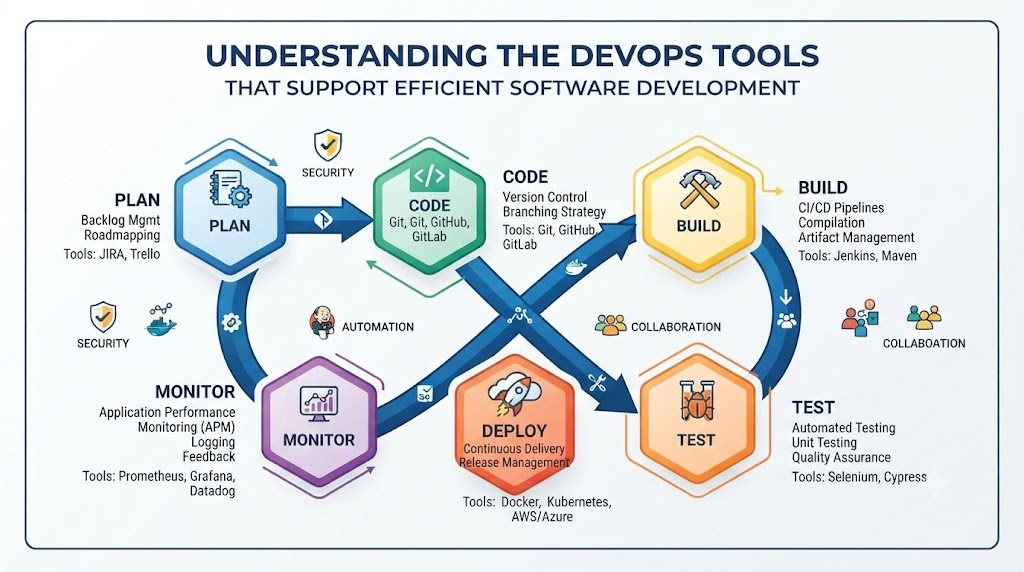
At its heart, DevOps is about breaking down the traditional walls between software development and IT operations. In the past, developers wrote code and handed it over a wall to operations teams to deploy and manage. That disconnect frequently resulted in broken builds, delayed releases, and finger-pointing when things went wrong. DevOps introduces a collaborative culture backed by continuous integration, automated testing, and rapid feedback loops. The goal is to ship software faster and more reliably without sacrificing stability. Rather than treating DevOps as a single piece of software or a quick certification, structured educational programs teach the underlying principles of automation, system architecture, and operational efficiency.
Why Structured Learning Matters for DevOps Success
Trying to learn DevOps by randomly picking up tools as you encounter them rarely works out well. Without a structured framework, learners usually run into a few classic roadblocks:
- Tool Fatigue: Jumping between dozens of different platforms without understanding the core concepts connecting them.
- All Theory, No Practice: Reading endless documentation without ever writing a configuration file or building a live pipeline.
- Misplaced Priorities: Spending weeks mastering a niche utility while missing fundamental Linux or networking principles.
A well-designed DevOps learning path ensures you master the basics first, building your knowledge layer by layer so you can tackle advanced cloud systems with confidence.
What Learners Should Understand Before Getting Started
Before diving into complex container clusters or multi-cloud automation, it helps to build a solid baseline of how applications run, talk to each other, and move across networks.
DevOps Fundamentals
Get comfortable with the software lifecycle. Understand how code travels from a developer’s local machine through automated build and test stages before reaching production. Key concepts include continuous delivery, version control, and continuous feedback.
Essential Technical Skills
A strong technical foundation makes learning advanced tools much smoother. Essential areas include:
- Linux: Navigating the command line, managing file permissions, and writing basic shell scripts.
- Networking: Understanding IP addresses, DNS resolution, HTTP traffic, and basic firewalls.
- Version Control: Using Git to track code changes and collaborate cleanly with team members.
Understanding the Learning Requirements
Everyone comes to DevOps from a different starting line. Software developers might need to spend extra time learning infrastructure and networking, while system administrators often need to focus more on coding, scripting, and CI/CD workflows. A flexible approach lets you tailor your studies to your background.
Building a Structured DevOps Learning Path
A reliable DevOps learning path follows a step-by-step progression from basic IT operations up to advanced cloud engineering. A typical study progression looks like this:
- Foundations: Learn the Linux command line, networking basics, and Git.
- Scripting: Pick up Bash or Python to automate repetitive administrative chores.
- CI/CD: Understand how to build automated pipelines that compile, test, and package code.
- Containers: Learn how to pack applications and dependencies neatly inside Docker containers.
- Cloud Computing: Explore cloud fundamentals and provision virtual infrastructure programmatically.
- Infrastructure as Code: Manage servers and networks using declarative configuration files.
- Observability: Set up metrics, logs, and alerts to keep a close eye on system health.
Understanding the DevOps Roadmap
A comprehensive DevOps roadmap acts as a visual guide to keep your studies organized and ensure you do not miss any critical skill areas.
| Learning Stage | Key Skills or Topics | Practical Learning Goal |
| Technical Foundations | Linux, Networking, Git, Bash Scripting | Navigate the command line and manage code repositories. |
| CI/CD & Automation | Jenkins, GitHub Actions, Build Pipelines | Automate code compilation, testing, and deployment. |
| Containerization | Docker, Container Registries, Image Building | Package applications into portable, isolated containers. |
| Cloud & Infrastructure | Cloud Platforms, Compute, Storage, IAM | Provision and configure secure cloud environments. |
| Infrastructure as Code | Terraform, Ansible, Configuration Management | Manage infrastructure declaratively through code. |
| Monitoring & Observability | Prometheus, Grafana, Logging, Alerting | Track system performance and troubleshoot operational issues. |
Exploring the DevOps Engineer Roadmap
Stepping up into an engineering role demands deeper technical proficiency across automation, cloud deployment, and system reliability.
Core Technical Foundations
Skilled engineers rely heavily on command-line fluency, robust shell scripts, and a deep understanding of network traffic. These skills make it much easier to debug server errors, diagnose latency issues, and write custom automation tasks.
Automation and CI/CD Skills
Engineers design robust pipelines that catch bugs early in the development cycle. This means configuring automated test suites, managing artifact repositories, and ensuring smooth, zero-downtime deployments.
Cloud and Infrastructure Skills
Modern applications run on distributed cloud infrastructure. Knowing how to manage cloud resources, configure virtual private clouds, and orchestrate containers with tools like Kubernetes is crucial for scaling systems.
Monitoring and Operational Skills
Keeping production environments healthy requires proactive oversight. Engineers configure metrics dashboards, set intelligent alert thresholds, and establish rapid incident response habits.
Understanding Essential DevOps Tools
Tools are simply the practical instruments engineers use to put automation and infrastructure management into action. The right tool always depends on your specific project needs.
Version Control Tools
Git is the universal standard for source code management. It allows teams to work on the same codebase simultaneously, manage branches, and resolve code merges safely.
CI/CD Tools
Automation servers like Jenkins, GitLab CI/CD, and GitHub Actions execute your workflows, turning raw source code into packaged, deployed applications automatically.
Containerization and Orchestration Tools
Docker standardizes how applications are packaged, while Kubernetes manages those containers at scale across multiple servers, handling networking, scaling, and self-healing.
Infrastructure as Code Tools
Terraform allows teams to define cloud infrastructure using clean configuration files, while Ansible automates software provisioning and configuration management across servers.
Monitoring and Observability Tools
Prometheus and Grafana gather and visualize system metrics, giving teams real-time visibility into CPU loads, memory consumption, and application performance.
DevOps Tools Comparison
When picking tools for a new project, comparing their primary purposes and use cases helps you make an informed choice.
| Tool | Main Purpose | Common Use Case | Important Consideration |
| Git | Version Control | Tracking source code changes and collaboration. | Requires understanding branching strategies and conflict resolution. |
| Docker | Containerization | Packaging applications with their dependencies. | Requires understanding container image layers and security best practices. |
| Terraform | Infrastructure as Code | Provisioning multi-cloud infrastructure declaratively. | Requires managing state files securely across team environments. |
| Jenkins | CI/CD Automation | Building and deploying software pipelines. | Requires maintaining and updating server plugins and agent nodes. |
Exploring DevOps Certifications
Certifications offer a structured way to validate your technical knowledge and guide your study goals. However, studying for an exam should always go hand-in-hand with practical lab work.
Most certifications focus on specific cloud platforms, container tools, or automation frameworks. A good certification curriculum teaches you official best practices, architecture patterns, and security principles. It is best to choose credentials that align with your current career stage and hands-on interests rather than collecting certificates without practical experience.
Creating a DevOps Certification Roadmap
Organizing your exam prep keeps you focused and prevents study burnout.
- Assess Your Baseline: Take stock of your current familiarity with Linux, cloud computing, and automation tools.
- Review Exam Objectives: Grab the official blueprint straight from the certification provider.
- Build a Study Schedule: Block out dedicated weeks for reading theory and running hands-on labs.
- Practice in Sandbox Environments: Spin up personal cloud or local test beds to experiment with configurations.
- Take Practice Exams: Evaluate your preparedness with sample questions and brush up on weak spots.
Understanding the SRE Roadmap
Site Reliability Engineering applies software engineering principles to IT operations. While DevOps centers heavily on cultural collaboration and delivery velocity, SRE focuses sharply on uptime, latency reduction, and capacity planning.
Key learning milestones on an SRE roadmap include:
- Defining Service Level Indicators (SLIs) and Service Level Objectives (SLOs).
- Managing error budgets to balance rapid feature releases with system stability.
- Establishing robust incident management and blameless post-mortem reviews.
- Automating away manual toil through software development.
Exploring the Platform Engineering Roadmap
Platform Engineering centers on building internal developer platforms that provide self-service infrastructure to product teams. This discipline reduces friction and cognitive load for developers by hiding complex cloud configurations behind streamlined internal portals.
Key areas on a Platform Engineering roadmap include:
- Designing internal developer portals and self-service interfaces.
- Creating standardized infrastructure templates and deployment workflows.
- Maintaining security, compliance, and governance across all provisioned environments.
- Integrating observability directly into platform workflows.
DevOps Skills and Career Opportunities
Building practical expertise across automation, cloud computing, and containerization opens up a variety of specialized technical career paths.
- DevOps Engineer: Focuses on CI/CD pipeline efficiency, infrastructure automation, and release engineering.
- Cloud Engineer: Specializes in building, securing, and maintaining cloud-native environments.
- Site Reliability Engineer: Concentrates on system availability, performance monitoring, and incident response.
- Platform Engineer: Builds internal developer platforms and self-service automation tooling.
How DevOpsSchool Relates to the Learning Journey
For learners seeking structured educational support, DevOpsSchool provides curated training programs, technical guides, and certification preparation materials. By emphasizing hands-on learning methods, the platform helps individuals navigate complex topics like container orchestration, cloud architecture, and infrastructure automation. Engaging with these educational offerings helps learners connect their studies directly to real-world engineering standards.
Practical Ways to Apply DevOps Knowledge
Reading about technology is only half the battle. You need to get your hands dirty with real-world tasks to truly understand how things work:
- Spin up a local Linux virtual machine and practice writing simple shell scripts.
- Initialize a Git repository and push your first set of configuration files.
- Build a basic CI/CD pipeline that automatically tests a sample web application.
- Write a custom Dockerfile to containerize a small application.
- Provision cloud infrastructure resources using Infrastructure as Code templates.
Common Challenges in DevOps Learning
It is completely normal to hit roadblocks while learning new technologies. Knowing what to watch out for helps you navigate them easily:
- Information Overload: Trying to learn too many tools at once without mastering the core basics first.
- Sandbox Isolation: Reading tutorials without setting up your own lab environments to test commands.
- Cloud Complexity: Struggling to wrap your head around cloud networking and security group rules.
- Tutorial Loops: Watching endless video guides without building original projects from scratch.
Breaking your study plan into smaller milestones and focusing on one tool at a time will keep your momentum going.
Best Practices for a Practical DevOps Learning Journey
- Nail the Fundamentals: Build a solid grip on Linux, networking, and version control before jumping into complex tools.
- Prioritize Hands-On Labs: Spend more time writing code and configuring pipelines than reading theory.
- Follow a Logical Sequence: Use structured roadmaps to guide your learning progression step by step.
- Consult Official Documentation: Always check official tool documentation to understand underlying mechanisms.
- Document Your Projects: Keep notes and portfolio repositories showcasing the infrastructure and pipelines you design.
How to Choose a Suitable DevOps Learning Path
Every professional journey is different. Figuring out the right path depends on a few personal considerations:
- Your current background (whether you come from development, testing, system administration, or a complete beginner).
- The specific tool stack used in your current or target workplace.
- How much daily study time you can reliably set aside.
- Your long-term career goals, whether you want to focus on CI/CD pipelines, site reliability, or platform engineering.
Frequently Asked Questions
What does a DevOps roadmap include?
A standard DevOps roadmap outlines a structured learning path covering Linux, version control, shell scripting, CI/CD pipelines, containerization, cloud platforms, infrastructure as code, and monitoring.
How can a beginner start a DevOps learning path?
Beginners should focus first on core IT fundamentals like the Linux command line, computer networking, and Git version control before moving into automated deployment tools.
What technical skills are relevant to a DevOps engineer roadmap?
Essential skills include shell scripting, pipeline configuration, container management with Docker and Kubernetes, cloud resource provisioning, and system monitoring.
Which DevOps tools should learners explore first?
Learners should start with foundational utilities like Git for version control, Bash for scripting, Docker for containers, and Jenkins or GitHub Actions for CI/CD.
How do DevOps certifications support technical learning?
Certifications provide clear learning objectives and validate foundational knowledge, helping learners organize their study goals and demonstrate technical commitment.
How does SRE differ from DevOps?
DevOps focuses on cultural collaboration and delivery speed across the entire software lifecycle, whereas SRE applies software engineering practices specifically to system reliability, uptime, and error budgets.
What does a Platform Engineering roadmap cover?
It covers internal developer platforms, self-service infrastructure automation, developer experience, and standardized template creation.
How should learners approach a DevOps tools comparison?
Evaluate tools based on their primary purpose, use cases, integration capabilities, learning curve, and community support rather than searching for a single universal winner.
How can I organize a DevOps certification roadmap?
Assess your current knowledge, review official exam objectives, allocate study time for hands-on labs, and take practice exams to verify your readiness.
What technical skills are valued in DevOps jobs?
Employers look for practical experience with automation, continuous integration, container orchestration, cloud infrastructure management, and collaborative problem-solving.
Conclusion
Mastering DevOps takes patience, consistent practice, and an organized approach to learning. By focusing on core technical foundations, building hands-on automation projects, and following a clear educational roadmap, you can develop the exact skills required for modern software delivery. Utilizing resources from educational platforms like DevOpsSchool helps structure this journey, ensuring that every new concept builds toward real engineering competence. Keep practicing, build your own projects, and stay curious as the technology evolves.
