Introduction
Smart Lighting Apps are software platforms that allow users to control, automate, and optimize lighting systems through mobile devices, voice assistants, or centralized dashboards. Instead of using traditional switches, these apps let you adjust brightness, colors, schedules, and scenes from anywhere—bringing flexibility and efficiency into modern homes and workplaces.
smart lighting is no longer just about turning lights on and off remotely. It now includes AI-driven automation, energy optimization, mood-based lighting, and integration with broader smart ecosystems. With increasing adoption of IoT and smart homes, lighting apps have become a key component of connected living.
Real-world use cases:
- Automated lighting schedules based on daily routines
- Mood lighting for entertainment, gaming, or relaxation
- Energy-efficient lighting management in homes and offices
- Security lighting with motion-triggered alerts
- Integration with voice assistants for hands-free control
What buyers should evaluate:
- Compatibility with lighting hardware (brands, protocols)
- Ease of use and UI experience
- Automation and scheduling capabilities
- Integration with smart home ecosystems
- Voice assistant support
- Energy monitoring features
- Offline/local control availability
- Customization and scene creation
- Security and data privacy
Best for: Homeowners, renters, smart home enthusiasts, hospitality businesses, and small offices seeking automation and energy efficiency.
Not ideal for: Users with traditional lighting setups or those who prefer manual control without digital automation.
Key Trends in Smart Lighting Apps
- AI-Based Lighting Automation: Apps learning user behavior and adjusting lighting automatically
- Matter Protocol Integration: Better cross-brand compatibility and easier setup
- Circadian Lighting: Adjusting brightness and color temperature based on time of day
- Voice-First Control: Deep integration with voice assistants
- Energy Optimization: Real-time tracking and energy-saving recommendations
- Scene-Based Automation: Predefined and customizable lighting environments
- Cloud + Local Hybrid Models: Faster response with improved remote access
- Security Enhancements: Encrypted communication and secure device pairing
- Subscription Features: Premium automation and analytics features
- Multi-Room Synchronization: Seamless lighting across large spaces
How We Selected These Tools (Methodology)
- Analyzed market adoption and user popularity
- Evaluated feature richness and automation capabilities
- Assessed compatibility with major lighting ecosystems
- Reviewed performance reliability and latency
- Considered security and privacy features
- Measured ease of use for beginners and advanced users
- Checked integration with voice assistants and IoT platforms
- Balanced consumer-friendly and advanced/customizable solutions
- Included both brand-specific and platform-agnostic apps
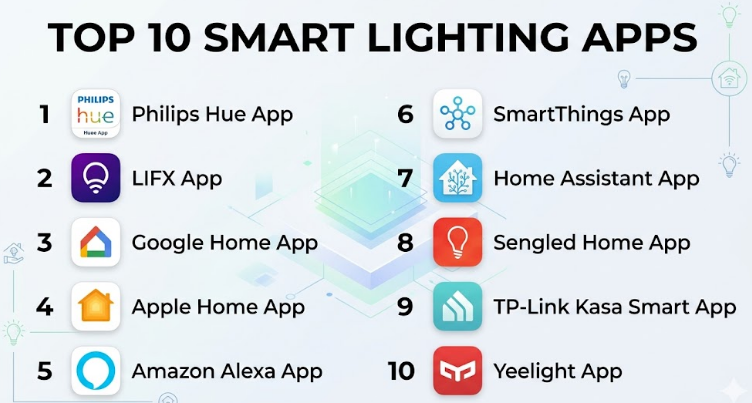
Top 10 Smart Lighting Apps
#1 — Philips Hue App
Short description: A leading smart lighting app designed for Philips Hue devices. Known for its polished interface and advanced scene customization, it is ideal for users who want premium lighting control.
Key Features
- Scene and ambiance customization
- Color and brightness control
- Scheduling and automation
- Entertainment sync features
- Multi-room grouping
Pros
- Highly intuitive interface
- Rich feature set
Cons
- Limited to Hue ecosystem
- Premium pricing
Platforms / Deployment
iOS / Android / Cloud
Security & Compliance
Encryption; compliance not publicly stated
Integrations & Ecosystem
Works seamlessly within the Hue ecosystem and integrates with various smart home systems.
- Voice assistants
- Smart home hubs
- Entertainment systems
Support & Community
Strong global support and active user base
#2 — LIFX App
Short description: A feature-rich app for LIFX smart lights offering vibrant color control and advanced effects without requiring a hub.
Key Features
- No hub required
- Advanced color effects
- Scheduling and automation
- Scene creation
- Music sync
Pros
- Easy setup
- Powerful lighting effects
Cons
- Limited third-party integrations
- App performance inconsistencies
Platforms / Deployment
iOS / Android / Cloud
Security & Compliance
Encryption; compliance not publicly stated
Integrations & Ecosystem
Primarily focused on LIFX devices with some integrations.
- Voice assistants
- Smart devices
Support & Community
Moderate support and user base
#3 — Google Home App
Short description: A centralized smart home app that includes lighting control as part of a broader ecosystem.
Key Features
- Centralized device control
- Voice integration
- Automation routines
- Multi-device support
Pros
- Unified ecosystem
- Simple interface
Cons
- Limited advanced lighting features
- Cloud dependency
Platforms / Deployment
iOS / Android / Cloud
Security & Compliance
Encryption; compliance not publicly stated
Integrations & Ecosystem
Strong integration with Google ecosystem and supported devices.
- Smart lights
- Speakers
- Cameras
Support & Community
Strong support and community
#4 — Apple Home App
Short description: Apple’s smart home app offering secure and seamless lighting control within the Apple ecosystem.
Key Features
- Secure automation
- Scene management
- Siri integration
- Device grouping
Pros
- Strong privacy focus
- Clean UI
Cons
- Limited device compatibility
- Apple-only environment
Platforms / Deployment
iOS / Cloud
Security & Compliance
End-to-end encryption
Integrations & Ecosystem
Works with HomeKit-enabled devices.
- Apple ecosystem
- Smart lighting devices
Support & Community
Strong support within Apple ecosystem
#5 — Amazon Alexa App
Short description: A versatile app that controls smart lighting through voice commands and routines.
Key Features
- Voice control
- Routine automation
- Multi-device support
- Smart grouping
Pros
- Easy to use
- Wide compatibility
Cons
- Limited advanced lighting customization
- Cloud reliance
Platforms / Deployment
iOS / Android / Cloud
Security & Compliance
MFA, encryption
Integrations & Ecosystem
Supports a wide range of smart devices.
- Lighting brands
- Smart home devices
Support & Community
Large ecosystem and support network
#6 — SmartThings App
Short description: A powerful app for managing smart lighting alongside other connected devices.
Key Features
- Multi-protocol support
- Automation engine
- Device grouping
- Scheduling
Pros
- Highly flexible
- Wide compatibility
Cons
- Complex setup
- Some cloud dependency
Platforms / Deployment
iOS / Android / Hybrid
Security & Compliance
Encryption; compliance not publicly stated
Integrations & Ecosystem
Extensive ecosystem and integrations.
- Smart appliances
- Lighting systems
- APIs
Support & Community
Strong developer and user community
#7 — Home Assistant App
Short description: An open-source app offering deep customization for advanced users.
Key Features
- Local control
- Custom automation
- Extensive integrations
- Dashboard customization
Pros
- Highly customizable
- Strong community
Cons
- Steep learning curve
- Requires setup effort
Platforms / Deployment
iOS / Android / Self-hosted
Security & Compliance
Varies / user-managed
Integrations & Ecosystem
Supports a wide range of integrations.
- IoT devices
- APIs
- Smart systems
Support & Community
Very active community
#8 — Sengled Home App
Short description: A simple and budget-friendly app for Sengled smart lighting products.
Key Features
- Easy setup
- Scheduling
- Brightness control
- Device grouping
Pros
- Affordable ecosystem
- Beginner-friendly
Cons
- Limited advanced features
- Smaller ecosystem
Platforms / Deployment
iOS / Android / Cloud
Security & Compliance
Not publicly stated
Integrations & Ecosystem
Primarily supports Sengled devices.
- Basic smart home integrations
Support & Community
Moderate support
#9 — TP-Link Kasa Smart App
Short description: A reliable app for controlling TP-Link smart lighting and home devices.
Key Features
- Remote control
- Scheduling
- Energy monitoring
- Scene creation
Pros
- Stable performance
- Easy setup
Cons
- Limited advanced automation
- Brand-specific
Platforms / Deployment
iOS / Android / Cloud
Security & Compliance
Encryption; compliance not publicly stated
Integrations & Ecosystem
Works within TP-Link ecosystem.
- Smart plugs
- Lighting devices
Support & Community
Good support and user base
#10 — Yeelight App
Short description: A flexible app supporting Yeelight smart lighting with strong customization options.
Key Features
- Color customization
- Scheduling
- Scene modes
- Voice integration
Pros
- Affordable
- Good customization
Cons
- Limited ecosystem
- App performance varies
Platforms / Deployment
iOS / Android / Cloud
Security & Compliance
Not publicly stated
Integrations & Ecosystem
Supports Yeelight and some third-party integrations.
- Smart devices
- Voice assistants
Support & Community
Moderate support
Comparison Table (Top 10)
| Tool Name | Best For | Platform(s) Supported | Deployment | Standout Feature | Public Rating |
|---|---|---|---|---|---|
| Philips Hue | Premium users | iOS, Android | Cloud | Scene control | N/A |
| LIFX | Hubless lighting | iOS, Android | Cloud | Advanced effects | N/A |
| Google Home | Ecosystem users | iOS, Android | Cloud | Unified control | N/A |
| Apple Home | Apple users | iOS | Cloud | Privacy-first | N/A |
| Amazon Alexa | Voice users | iOS, Android | Cloud | Voice automation | N/A |
| SmartThings | Flexible users | iOS, Android | Hybrid | Multi-device control | N/A |
| Home Assistant | Advanced users | iOS, Android | Self-hosted | Custom automation | N/A |
| Sengled Home | Budget users | iOS, Android | Cloud | Simplicity | N/A |
| TP-Link Kasa | Reliability | iOS, Android | Cloud | Energy monitoring | N/A |
| Yeelight | Affordable users | iOS, Android | Cloud | Custom lighting | N/A |
Evaluation & Scoring of Smart Lighting Apps
| Tool Name | Core | Ease | Integrations | Security | Performance | Support | Value | Weighted Total |
|---|---|---|---|---|---|---|---|---|
| Philips Hue | 9 | 9 | 8 | 8 | 9 | 9 | 7 | 8.6 |
| LIFX | 8 | 8 | 7 | 7 | 8 | 7 | 8 | 7.8 |
| Google Home | 8 | 9 | 8 | 7 | 8 | 8 | 8 | 8.2 |
| Apple Home | 8 | 8 | 7 | 9 | 8 | 8 | 7 | 8.1 |
| Amazon Alexa | 8 | 9 | 9 | 7 | 8 | 9 | 8 | 8.5 |
| SmartThings | 9 | 7 | 9 | 7 | 8 | 8 | 8 | 8.3 |
| Home Assistant | 10 | 5 | 10 | 8 | 9 | 9 | 9 | 8.8 |
| Sengled | 7 | 8 | 6 | 6 | 7 | 7 | 8 | 7.2 |
| TP-Link Kasa | 8 | 9 | 7 | 7 | 8 | 8 | 9 | 8.2 |
| Yeelight | 7 | 8 | 6 | 6 | 7 | 7 | 8 | 7.1 |
How to interpret scores:
These scores compare tools across key dimensions. Higher scores indicate balanced performance. Tools like Home Assistant excel in flexibility but require effort, while apps like Alexa and Hue focus on ease and ecosystem strength.
Which Smart Lighting Apps
Solo / Freelancer
Choose TP-Link Kasa or Alexa for simplicity and cost-effectiveness.
SMB
SmartThings or Google Home offer scalability and integration.
Mid-Market
Philips Hue provides advanced features and reliability.
Enterprise
Home Assistant enables deep customization and integration.
Budget vs Premium
Budget: Sengled, Yeelight
Premium: Philips Hue, Home Assistant
Feature Depth vs Ease of Use
- Easy: Alexa, Google Home
- Advanced: Home Assistant, SmartThings
Integrations & Scalability
- Best: Home Assistant, SmartThings
Security & Compliance Needs
- Strong privacy: Apple Home
- Local control: Home Assistant
Frequently Asked Questions (FAQs)
1. What is a smart lighting app?
It is a mobile or web application used to control and automate smart lighting devices remotely.
2. Do I need special bulbs?
Yes, smart lighting requires compatible bulbs or lighting systems.
3. Can I control lights remotely?
Yes, most apps allow remote access through the internet.
4. Are these apps secure?
Most use encryption, but security varies by platform.
5. Do they work offline?
Some apps support local control; others require internet access.
6. Can I integrate with voice assistants?
Yes, most apps support Alexa, Google Assistant, or Siri.
7. Are there subscription costs?
Basic features are usually free; advanced features may require subscriptions.
8. Can I automate lighting schedules?
Yes, scheduling is a core feature of most apps.
9. Which app is best for beginners?
Alexa and Google Home are easiest to use.
10. Which app is best for customization?
Home Assistant offers the highest level of customization.
Conclusion
Smart Lighting Apps have transformed how we interact with lighting—moving from simple on/off control to intelligent, automated, and context-aware systems. Whether you prioritize ease of use, ecosystem integration, affordability, or advanced customization, the right app depends on your specific needs and technical comfort level. Beginners may find platforms like Alexa, Google Home, or TP-Link Kasa ideal, while advanced users will appreciate the flexibility of Home Assistant or SmartThings. Ultimately, the best approach is to shortlist two or three apps that align with your devices and goals, test their performance in real-world scenarios, and validate how well they integrate into your broader smart home ecosystem before making a long-term commitment.
