Introduction
Food Safety Compliance (HACCP) Software helps restaurants, food manufacturers, and hospitality businesses manage food safety processes digitally. HACCP (Hazard Analysis and Critical Control Points) is a structured approach to identifying and controlling food safety risks, and these tools simplify documentation, monitoring, and compliance reporting.
environment, where regulatory pressure, consumer awareness, and operational transparency are increasing, manual food safety tracking is no longer sustainable. Businesses need real-time monitoring, automated alerts, and audit-ready documentation to maintain compliance and avoid costly penalties or reputational damage.
Real-world use cases include:
- Monitoring food temperatures in kitchens and storage units
- Managing HACCP logs and compliance checklists
- Preparing for audits and inspections
- Ensuring staff follow food safety protocols
- Tracking incidents and corrective actions
What buyers should evaluate:
- Digital HACCP plan creation and management
- Real-time monitoring and alerting
- Mobile accessibility for staff
- Audit and reporting capabilities
- Integration with IoT sensors and kitchen devices
- Ease of use for non-technical staff
- Scalability across multiple locations
- Data security and compliance standards
- Training and onboarding support
- Pricing and long-term value
Best for: Restaurants, cloud kitchens, food production companies, hospitality chains, and compliance-driven operations.
Not ideal for: Small food vendors with minimal compliance requirements or businesses relying on basic manual processes.
Key Trends in Food Safety Compliance (HACCP) Software
- Increasing adoption of IoT-enabled temperature monitoring
- AI-driven predictive risk detection and alerts
- Mobile-first applications for frontline staff
- Cloud-based compliance platforms replacing paper logs
- Integration with kitchen equipment and POS systems
- Real-time audit readiness and automated reporting
- Subscription-based pricing models
- Growing emphasis on data traceability and transparency
- Increased focus on regulatory compliance across regions
- Automation of corrective actions and incident management
How We Selected These Tools (Methodology)
- Industry adoption across food safety and compliance sectors
- Feature depth in HACCP plan management and monitoring
- Reliability and real-time performance capabilities
- Ease of use for kitchen and compliance staff
- Integration capabilities with IoT devices and systems
- Vendor reputation and ecosystem maturity
- Scalability for multi-location operations
- Availability of analytics and reporting tools
- Support and onboarding quality
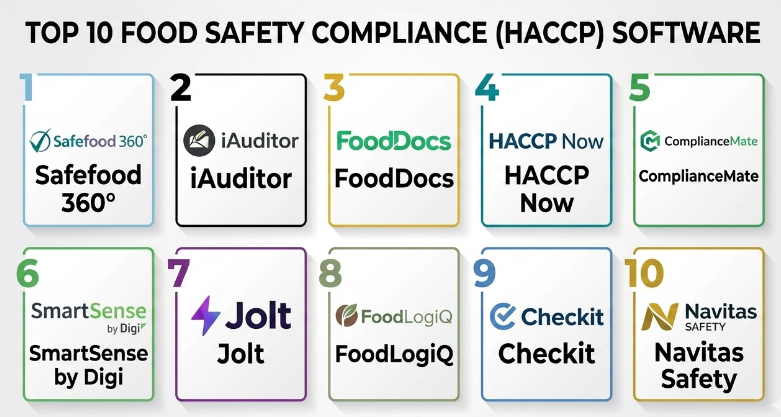
Top 10 Food Safety Compliance (HACCP) Software
#1 — Safefood 360°
Short description (5-6 lines): Safefood 360° is a comprehensive food safety and quality management platform designed for enterprises. It supports full HACCP plan creation and compliance tracking. The software helps automate workflows and manage documentation. It is widely used in food manufacturing and hospitality. It focuses on regulatory compliance and audit readiness.
Key Features
- HACCP plan management
- Audit and compliance tracking
- Document management
- Incident and corrective action tracking
- Supplier management
- Reporting dashboards
Pros
- Highly comprehensive compliance features
- Strong audit capabilities
Cons
- Complex for small businesses
- Higher cost
Platforms / Deployment
Web
Cloud
Security & Compliance
Not publicly stated
Integrations & Ecosystem
Supports integration with enterprise systems and compliance tools.
- ERP systems
- API integrations
- Document systems
Support & Community
Enterprise-level support with onboarding and training.
#2 — iAuditor (SafetyCulture)
Short description (5-6 lines): iAuditor is a flexible inspection and compliance platform used across industries, including food safety. It enables digital checklists and HACCP logging. The platform is user-friendly and mobile-first. It is suitable for SMBs and enterprises. It focuses on inspections and reporting.
Key Features
- Digital inspections
- HACCP checklists
- Reporting and analytics
- Mobile access
- Workflow automation
Pros
- Easy to use
- Strong mobile capabilities
Cons
- Limited advanced HACCP features
- Customization can be limited
Platforms / Deployment
Web / iOS / Android
Cloud
Security & Compliance
Not publicly stated
Integrations & Ecosystem
Supports integrations with business tools and APIs.
- API integrations
- Reporting tools
Support & Community
Strong documentation and support resources.
#3 — FoodDocs
Short description (5-6 lines): FoodDocs is a HACCP-focused platform designed to simplify food safety compliance. It automates HACCP plan creation and monitoring. It is widely used by restaurants and small food businesses. The platform focuses on simplicity and automation. It supports compliance with minimal manual effort.
Key Features
- Automated HACCP plan creation
- Monitoring and logging
- Compliance tracking
- Alerts and notifications
- Reporting
Pros
- Simple and intuitive
- Fast setup
Cons
- Limited enterprise features
- Less customization
Platforms / Deployment
Web
Cloud
Security & Compliance
Not publicly stated
Integrations & Ecosystem
Basic integration capabilities.
- API support
- Reporting tools
Support & Community
Offers onboarding and basic support.
#4 — HACCP Now
Short description (5-6 lines): HACCP Now is a mobile-first HACCP compliance solution. It helps restaurants digitize food safety logs and processes. The platform is simple and easy to use. It focuses on real-time compliance tracking. It is ideal for small and mid-sized businesses.
Key Features
- Digital HACCP logs
- Temperature monitoring
- Compliance alerts
- Reporting
- Mobile access
Pros
- Easy to implement
- Affordable
Cons
- Limited advanced analytics
- Not enterprise-focused
Platforms / Deployment
iOS / Android
Cloud
Security & Compliance
Not publicly stated
Integrations & Ecosystem
Limited integrations available.
- Basic reporting tools
Support & Community
Basic support and documentation.
#5 — ComplianceMate
Short description (5-6 lines): ComplianceMate is a food safety monitoring platform that integrates with IoT sensors. It provides real-time temperature tracking and alerts. It is widely used in restaurants and food service operations. The platform focuses on automation and accuracy. It supports compliance and audit readiness.
Key Features
- IoT temperature monitoring
- Real-time alerts
- HACCP compliance tracking
- Reporting
- Audit tools
Pros
- Strong automation features
- Accurate monitoring
Cons
- Requires hardware setup
- Higher cost
Platforms / Deployment
Web / Mobile
Cloud
Security & Compliance
Not publicly stated
Integrations & Ecosystem
Supports integration with IoT devices and systems.
- Sensor integrations
- API support
Support & Community
Provides onboarding and technical support.
#6 — SmartSense by Digi
Short description (5-6 lines): SmartSense is an enterprise-grade IoT monitoring platform for food safety. It provides real-time tracking of environmental conditions. It is widely used by large food chains. The platform focuses on automation and compliance. It supports predictive analytics.
Key Features
- IoT monitoring
- Real-time alerts
- Predictive analytics
- Compliance reporting
- Data logging
Pros
- Advanced analytics
- Highly scalable
Cons
- Expensive
- Complex setup
Platforms / Deployment
Web / Mobile
Cloud
Security & Compliance
Not publicly stated
Integrations & Ecosystem
Supports enterprise integrations.
- IoT devices
- API integrations
Support & Community
Enterprise support available.
#7 — Jolt
Short description (5-6 lines): Jolt is a digital operations platform with strong food safety features. It helps restaurants manage compliance and staff accountability. The platform includes checklists and monitoring tools. It is widely used in hospitality. It focuses on simplicity and efficiency.
Key Features
- Digital checklists
- HACCP compliance
- Staff management
- Reporting
- Alerts
Pros
- Easy to use
- Good for team management
Cons
- Limited advanced features
- Not enterprise-focused
Platforms / Deployment
Web / Mobile
Cloud
Security & Compliance
Not publicly stated
Integrations & Ecosystem
Supports integrations with business tools.
- API support
- Reporting tools
Support & Community
Offers onboarding and support.
#8 — FoodLogiQ
Short description (5-6 lines): FoodLogiQ is a food safety and traceability platform. It helps manage compliance and supply chain transparency. It is used by enterprises. The platform focuses on traceability and risk management. It supports regulatory compliance.
Key Features
- Traceability
- Compliance tracking
- Risk management
- Reporting
- Supplier management
Pros
- Strong traceability features
- Enterprise-grade
Cons
- Complex
- Expensive
Platforms / Deployment
Web
Cloud
Security & Compliance
Not publicly stated
Integrations & Ecosystem
Supports enterprise integrations.
- ERP systems
- API integrations
Support & Community
Enterprise support available.
#9 — Checkit
Short description (5-6 lines): Checkit is a compliance and operations platform with food safety capabilities. It helps businesses manage HACCP processes digitally. The platform includes monitoring and reporting tools. It is suitable for SMBs and enterprises. It focuses on automation.
Key Features
- HACCP compliance
- Monitoring tools
- Reporting
- Alerts
- Analytics
Pros
- Flexible
- Good reporting
Cons
- Limited customization
- UI improvements needed
Platforms / Deployment
Web / Mobile
Cloud
Security & Compliance
Not publicly stated
Integrations & Ecosystem
Supports integration with business tools.
- API support
- Reporting tools
Support & Community
Provides onboarding and support.
#10 — Navitas Safety
Short description (5-6 lines): Navitas Safety is a compliance management platform with food safety capabilities. It helps manage HACCP and regulatory requirements. The platform supports reporting and monitoring. It is suitable for enterprises. It focuses on compliance.
Key Features
- HACCP compliance
- Monitoring
- Reporting
- Risk management
- Alerts
Pros
- Comprehensive compliance tools
- Enterprise-focused
Cons
- Complex setup
- Higher cost
Platforms / Deployment
Web
Cloud
Security & Compliance
Not publicly stated
Integrations & Ecosystem
Supports enterprise integrations.
- API integrations
- ERP systems
Support & Community
Enterprise support available.
Comparison Table (Top 10)
| Tool Name | Best For | Platform(s) Supported | Deployment | Standout Feature | Public Rating |
|---|---|---|---|---|---|
| Safefood 360° | Enterprise | Web | Cloud | Compliance management | N/A |
| iAuditor | SMB & Enterprise | Web, Mobile | Cloud | Inspections | N/A |
| FoodDocs | SMB | Web | Cloud | HACCP automation | N/A |
| HACCP Now | SMB | Mobile | Cloud | Digital logs | N/A |
| ComplianceMate | SMB & Mid | Web, Mobile | Cloud | IoT monitoring | N/A |
| SmartSense | Enterprise | Web, Mobile | Cloud | Predictive analytics | N/A |
| Jolt | SMB | Web, Mobile | Cloud | Staff compliance | N/A |
| FoodLogiQ | Enterprise | Web | Cloud | Traceability | N/A |
| Checkit | SMB & Mid | Web, Mobile | Cloud | Monitoring | N/A |
| Navitas Safety | Enterprise | Web | Cloud | Risk management | N/A |
Evaluation & Scoring of Food Safety Compliance (HACCP) Software
| Tool Name | Core (25%) | Ease (15%) | Integrations (15%) | Security (10%) | Performance (10%) | Support (10%) | Value (15%) | Weighted Total |
|---|---|---|---|---|---|---|---|---|
| Safefood 360° | 9 | 6 | 8 | 7 | 9 | 8 | 6 | 8.0 |
| iAuditor | 8 | 9 | 7 | 6 | 8 | 8 | 8 | 8.0 |
| FoodDocs | 7 | 9 | 6 | 6 | 7 | 7 | 9 | 7.6 |
| HACCP Now | 7 | 9 | 5 | 6 | 7 | 7 | 9 | 7.5 |
| ComplianceMate | 8 | 7 | 7 | 6 | 8 | 7 | 7 | 7.5 |
| SmartSense | 9 | 6 | 8 | 7 | 9 | 8 | 6 | 8.1 |
| Jolt | 7 | 9 | 6 | 6 | 7 | 7 | 8 | 7.5 |
| FoodLogiQ | 9 | 6 | 9 | 7 | 9 | 8 | 6 | 8.2 |
| Checkit | 7 | 8 | 7 | 6 | 7 | 7 | 7 | 7.3 |
| Navitas Safety | 8 | 6 | 8 | 7 | 8 | 8 | 6 | 7.9 |
How to interpret scores:
These scores reflect relative strengths across categories. Enterprise tools score higher in features and scalability, while SMB tools excel in usability and cost efficiency. Choose based on your operational needs rather than just total score.
Which Food Safety Compliance (HACCP) Software
Solo / Freelancer
Tools like FoodDocs and HACCP Now are simple and easy to use.
SMB
Jolt, iAuditor, and ComplianceMate provide good balance.
Mid-Market
Checkit and ComplianceMate offer scalability and features.
Enterprise
Safefood 360°, SmartSense, and FoodLogiQ are best suited.
Budget vs Premium
Budget tools focus on simplicity; premium tools offer automation and analytics.
Feature Depth vs Ease of Use
Advanced tools provide more control but require training.
Integrations & Scalability
Choose tools with API support for long-term growth.
Security & Compliance Needs
Enterprises should prioritize advanced compliance features.
Frequently Asked Questions (FAQs)
1. What is HACCP software?
It is software that helps manage food safety processes and compliance digitally.
2. Is HACCP software mandatory?
It depends on local regulations, but it is highly recommended.
3. How much does it cost?
Pricing varies based on features and business size.
4. Can small restaurants use it?
Yes, many tools are designed for SMBs.
5. Does it integrate with kitchen equipment?
Some tools support IoT integrations.
6. Is training required?
Basic tools are easy; advanced platforms need onboarding.
7. Can it replace manual logs?
Yes, most tools fully digitize compliance tracking.
8. How secure is the data?
Security varies; evaluate vendor features carefully.
9. Can I scale across locations?
Yes, most tools support multi-location setups.
10. What is the biggest mistake?
Choosing a tool without considering scalability.
Conclusion
Food Safety Compliance (HACCP) software has evolved from simple checklist tools into advanced platforms that combine automation, real-time monitoring, and analytics. As food safety regulations tighten and customer expectations grow, these tools are becoming essential for maintaining compliance and operational efficiency. However, the right solution depends on your business size, complexity, and compliance requirements. Small businesses may prioritize ease of use and affordability, while enterprises need scalability and advanced analytics. The best approach is to shortlist a few tools, test them in real-world scenarios, and evaluate how well they integrate into your existing workflows before making a final decision.
