Introduction
Launching new software feels exciting until an unseen flaw crashes the live site. Many engineering teams push code fast while skipping basic backup checks, alert rules, or capacity limits. One missed detail can lock out customers, trigger midnight pages, and damage hard-earned trust.
Cloud platforms rely on many connected layers that must stay in sync. Containers, build pipelines, cloud accounts, and security scanners all shape daily reliability. Without a clear plan, engineers waste time reacting to constant surprises.
This article walks through practical steps to make cloud systems calmer and stronger. You will explore release checks, delivery growth, Kubernetes care, platform tools, reliability goals, incident habits, security checks, system visibility, and smart spending. Following clear guides from OpsRoadmaps helps teams build steady progress with less guesswork.
Understanding Production Readiness in Practice
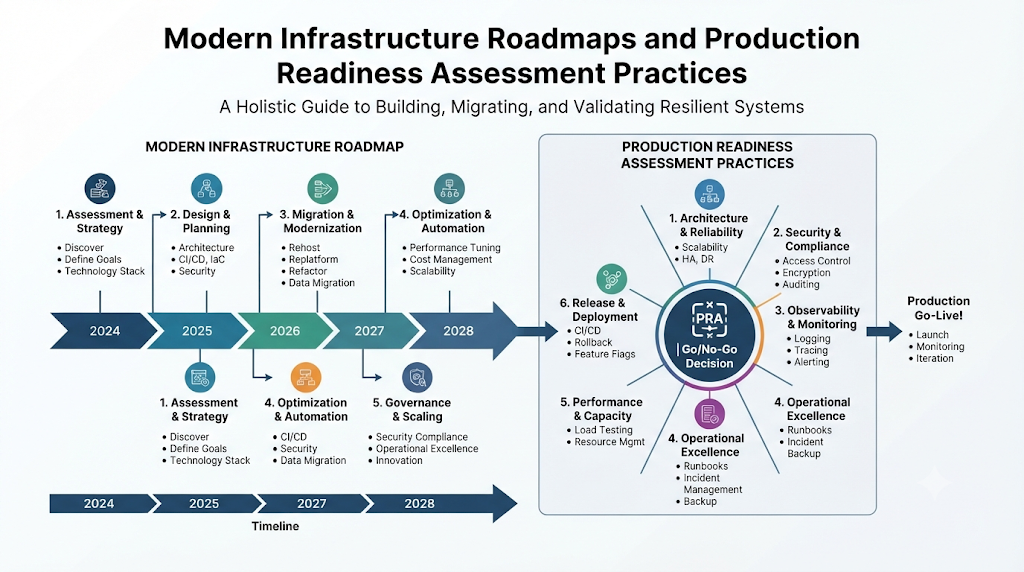
A production readiness assessment verifies whether an app can survive real traffic and support needs. Before launch, the team asks a direct question. Can we keep this service running and fix it fast when trouble hits?
A solid review covers app stability, server capacity, access rules, and data backups. It also checks monitoring, alert routing, deployment steps, and disaster recovery plans. Teams walk through these areas together before opening traffic to users.
Making Readiness a Daily Routine
Software never sits still because teams ship updates and patches every week. A review completed six months ago cannot protect today’s release. Teams should treat readiness as an ongoing routine instead of a one-time hurdle.
No single review can promise a flawless launch without any bugs. Still, regular checks catch costly blind spots before customers notice them. Fixing a missing alert or broken restore script early saves hours of emergency work.
Overlooking Everyday Launch Risks
Many teams test normal user flows and forget to test failure modes. Services sometimes launch without a tested rollback step or clear recovery notes. Missing documentation forces responders to guess under pressure during an outage.
Teams can close these gaps with small, repeatable habits. Assign a clear owner to every alert and test backup restores on a schedule. Keep review lists short and practical so engineers follow them naturally.
Evaluating Delivery Habits With a DevOps Maturity Assessment
A DevOps maturity assessment helps teams measure how smoothly code moves from laptop to production. It examines teamwork, version control, automation, testing, and live feedback loops. Engineering leaders use these insights to spot slow handoffs.
Early-stage teams often depend on manual deployments and separate silos. Growing teams automate builds, unit tests, and repeatable server setups. Mature teams combine fast automated pipelines with steady monitoring and shared accountability.
Pillars of Strong Software Delivery
Reliable delivery begins with clean source control and small, frequent code merges. Automated test suites catch bugs early before changes reach shared environments. Infrastructure as Code ensures servers and networks stay identical across every stage.
Fast feedback keeps delivery safe as release speed increases. Teams watch live metrics after every deploy and fix weak spots right away. When developers and operations share goals, releases become calm and routine.
Using Maturity Results to Plan Next Steps
An assessment creates real value only when it drives focused action. Choose one or two major bottlenecks instead of overhauling every tool at once. Fixing slow test runs often pays off faster than adding complex release tools.
Revisit your delivery habits every quarter as products and teams grow. Update priorities when traffic or compliance needs shift. OpsRoadmaps helps teams organize these improvements into clear, manageable stages.
| Delivery Area | Starting Point | Mature Practice |
|---|---|---|
| Version Control | Big infrequent merges | Small daily commits with peer review |
| Infrastructure | Manual server setup | Versioned code templates for all environments |
| Quality Checks | Manual testing near release | Fast automated tests on every commit |
| Deployments | High-risk weekend launches | Frequent, automated, reversible releases |
Preparing Kubernetes Workloads for Real Traffic
Running containers in production requires careful setup across clusters and apps. A Kubernetes production readiness checklist guides teams through vital safety settings before launch. Good defaults keep one misbehaving container from harming the whole cluster.
Essential Cluster and Workload Controls
Define CPU and memory requests and limits for every running container. Requests help Kubernetes place workloads evenly, while limits prevent noisy neighbors from hogging nodes. Configure liveness and readiness probes so the platform routes traffic only to healthy pods.
Protect workloads against node loss and unauthorized access. Run multiple replicas across availability zones, apply network policies, and restrict user permissions. Manage secrets securely, back up persistent volumes, and verify restore steps regularly.
Kubernetes CrashLoopBackOff Troubleshooting
Encountering a CrashLoopBackOff status means a container starts, fails quickly, and keeps restarting. Kubernetes pauses longer between each restart attempt to protect cluster resources. Simply deleting or restarting pods over and over will not solve the underlying bug.
Containers usually crash because of startup code errors, wrong entry commands, or missing variables. Corrupted config maps, memory limits, and failing health probes also cause repeated exits. Engineers should inspect real evidence before editing deployment files.
Step-by-Step Diagnosis Commands
Begin by checking pod health and restart counts across your namespace. Run kubectl get pods to identify which specific pod is failing. Next, execute kubectl describe pod to inspect recent events, exit codes, and probe failures.
Examine the application output to see the exact error message before exit. Run kubectl logs for active containers or kubectl logs --previous to read logs from the last crashed instance. Finally, run kubectl get events to spot wider cluster or scheduling issues.
Match the clue to the real fix, such as raising a tight memory limit or correcting a missing secret key. Update your configuration cleanly and roll out the change. Watch the pod status to confirm steady operation.
Building Developer Speed Through Platform Engineering
Developers often lose hours wiring up pipelines, permissions, and cloud resources by hand. A platform engineering adoption roadmap shows how to build shared tools that remove repetitive setup work. The aim is effortless self-service backed by safe defaults.
Designing Around Developer Feedback
Interview developers first to learn which daily tasks slow them down most. Look for repeated requests, such as creating new services, databases, or staging environments. Effective platforms solve actual bottlenecks instead of adding confusing tools.
Launch a lean first version focused on one high-value workflow. Provide clean service templates, golden pipelines, and a clear service catalog. Gather honest feedback from early users and refine the experience steadily.
Embedding Safety Into Self-Service
Developers adopt internal platforms willingly when those tools make work faster. Build security policies, cost tags, and logging agents directly into every template. Teams gain compliant infrastructure automatically without waiting in ticket queues.
Not every company needs a massive internal developer portal on day one. Smaller teams can start with shared scripts, clean documentation, and reusable modules. Expand your platform only as real organizational needs grow.
Bringing Clear Reliability Goals With SRE
Site Reliability Engineering applies practical engineering discipline to daily operations. An SRE adoption roadmap helps teams balance fast feature delivery with dependable uptime. Clear metrics replace guesswork when deciding how safe a system truly is.
Measuring What Users Experience
Identify your most important user actions, such as signing in or completing an order. Choose Service Level Indicators that reflect real user experience, like latency and success rate. Set realistic Service Level Objectives to define healthy targets for each metric.
Use Service Level Agreements for formal external commitments with customers. Track error budgets to see how much failure risk remains within a given window. If frequent releases burn through the budget, pause new features and fix stability first.
Reducing Manual Toil and Learning From Failure
Repetitive manual tasks that scale with traffic are known as toil. Automating routine checks, cleanups, and failovers gives engineers time for deeper improvements. Hold regular reliability reviews to keep targets aligned with business growth.
After any major outage, lead a blameless post-incident review with the team. Examine broken safeguards and missing signals rather than blaming individuals. OpsRoadmaps provides structured guidance to help teams adopt these reliability habits step by step.
Strengthening Response With an Incident Management Maturity Model
Even carefully built cloud systems face unexpected failures and traffic spikes. An incident management maturity model helps teams improve how they spot, resolve, and learn from disruptions. Better structure keeps everyone calm when minutes matter.
Replacing Chaos With Clear Coordination
Less mature teams struggle with alert storms and scattered chat messages. Stronger teams filter alerts down to true user impact and assign clear on-call owners. Simple severity levels help responders judge urgency right away.
Assign an incident commander to coordinate actions while technical leads investigate root causes. Use clear escalation paths when specialized help is needed. Post brief, steady updates so stakeholders stay informed without interrupting responders.
Turning Outages Into Lasting Improvements
Restoring user traffic marks the midpoint of incident handling, not the finish line. Capture an accurate timeline and identify contributing factors while memories remain sharp. Create specific follow-up tasks with named owners and realistic deadlines.
Share findings openly across engineering teams so everyone learns from close calls. Track open action items until teams complete the fixes. Consistent learning turns painful outages into stronger defenses.
| Maturity Level | Detection and Response | Post-Incident Habits |
|---|---|---|
| Ad-Hoc | Alert fatigue, unclear roles, slow triage | Quick workarounds with no follow-up |
| Defined | Severity tiers, assigned leads, shared runbooks | Written reviews and tracked fixes |
| Adaptive | Actionable alerts, regular game days | Cross-team learning and proactive prevention |
Weaving Security Into Delivery With DevSecOps
Waiting until launch week to check security creates delays and hidden risks. A DevSecOps implementation roadmap integrates security checks directly into everyday coding and deployment steps. Security works best when every engineer shares ownership.
Automating Early Security Checks
Identify your highest risks first, such as leaked credentials or outdated packages. Add static code scans, dependency checks, secret detection, and container image scans into build pipelines. Deliver clear, actionable feedback inside pull requests so developers fix flaws fast.
Enforce least-privilege access rules across cloud accounts and cluster roles. Scan Infrastructure as Code templates to block open ports or unencrypted storage before deployment. Prioritize findings by real risk so teams focus on critical exposures.
Combining Tools With Human Judgment
Developers understand application logic, while security specialists understand attacker methods. Close collaboration helps both groups solve problems without friction. Start with lightweight checks and expand coverage gradually as habits mature.
Automated scanners cannot catch every design flaw or business logic weakness. Pair pipeline checks with thoughtful code reviews, timely patching, and clear access policies. Steady habits protect systems while keeping delivery moving smoothly.
Gaining Deeper Insight Through Observability
Basic monitoring alerts you when a server breaks, while observability helps explain why it happened. An observability maturity model guides teams from simple health pings to full system understanding. Rich telemetry helps engineers solve complex issues quickly.
Connecting Metrics, Logs, and Traces
Metrics capture numerical trends over time, such as request rates, latency, and memory usage. Logs record detailed event messages from applications and infrastructure components. Distributed traces follow a single user request across multiple services to expose bottlenecks.
Send logs and traces to central tools so responders can search everything together. Design focused dashboards around user journeys instead of packing screens with endless charts. Too many noisy panels slow people down during real emergencies.
Moving From Symptoms to Root Causes
Early setups often show a spike in errors without revealing which service triggered it. Linking metrics, logs, and traces with shared request IDs lets engineers pinpoint failures in seconds. Synthetic checks and real user monitoring also expose browser or network issues.
Improve visibility on critical services first rather than instrumenting everything blindly. Remove unused metrics and noisy logs that clutter search results. Clear, connected signals help teams fix subtle problems with confidence.
Managing Cloud Spend Without Hurting Uptime
Cloud expenses rise quickly when test servers, unused disks, and oversized nodes run unchecked. A cloud cost optimization roadmap helps teams trim unnecessary spend while protecting speed and reliability. Smart cost habits belong inside daily engineering work.
Finding Waste and Matching Real Demand
Begin with clear visibility by tagging cloud resources by team, service, and environment. Audit accounts regularly to remove idle load balancers, unattached storage volumes, and stale snapshots. Adjust instance sizes and container limits based on actual usage data.
Enable autoscaling so capacity expands during peak hours and shrinks overnight. Pause non-production environments outside working hours when teams do not need them. Commit to reserved capacity only after confirming steady baseline demand.
Protecting Performance While Saving Money
Never cut cloud bills by deleting vital backups, removing redundancy, or skipping security tools. Configure budget alerts to warn teams early when daily spend jumps unexpectedly. Review spending trends alongside latency and error metrics every month.
Small cleanups across dozens of services create meaningful savings over time. Verify system performance after every change to ensure users feel zero slowdown. Pairing cost reviews with structured guides from OpsRoadmaps helps teams scale efficiently.
Turning Assessments Into Actionable Engineering Plans
Assessments reveal current gaps, while clear roadmaps turn those findings into steady progress. List your top risks across delivery speed, reliability, security, and cloud cost. Select a small batch of practical improvements that fit your team’s capacity.
Assign clear owners, realistic timelines, and simple success signals to every goal. Avoid introducing five major tools or processes in the same quarter. Roll out one improvement, verify its impact, and refine your approach before moving on.
Look for upgrades that strengthen multiple areas at once. Better observability speeds up incident resolution, and cleaner pipelines simplify launch checks. A practical roadmap keeps teams focused without causing burnout.
Frequently Asked Questions
Why do teams run a production readiness assessment before launching? It confirms that an application is stable, secure, monitored, and recoverable before real users rely on it. Reviewing backups, alerts, and capacity early reduces launch surprises.
What does a DevOps maturity assessment measure? It evaluates how effectively teams use version control, automated testing, deployment pipelines, and feedback loops. The results highlight bottlenecks that slow down safe software delivery.
Which items belong in a Kubernetes production readiness checklist? Key items include CPU and memory limits, health probes, multiple replicas, and network policies. Teams should also verify secret storage, backups, access controls, and centralized logging.
How should engineers approach Kubernetes CrashLoopBackOff troubleshooting? Inspect pod status and recent events first, then check current and previous container logs. Use those specific error details to fix code bugs, bad configs, or tight memory limits.
How do you start a platform engineering adoption roadmap? Begin by identifying repetitive setup tasks that frustrate developers every day. Build a small self-service template or pipeline first and expand based on real user feedback.
What is the purpose of an SRE adoption roadmap? It guides teams in setting measurable reliability targets using SLIs, SLOs, and error budgets. Pairing clear targets with automation and blameless reviews helps keep services dependable.
How does an incident management maturity model help during outages? It replaces noisy alerts and confusion with clear severity tiers, defined roles, and structured communication. Post-incident reviews ensure teams fix root causes rather than repeating mistakes.
What steps belong in a DevSecOps implementation roadmap? Teams add code, dependency, secret, and container checks directly into CI/CD pipelines. Combining automated scans with least-privilege access makes security a shared daily habit.
How does an observability maturity model improve debugging? It helps teams connect metrics, logs, and traces so they can trace problems across distributed services quickly. Focused signals replace guesswork during complex performance issues.
How can teams execute a cloud cost optimization roadmap safely? Tag resources clearly, delete unused storage or idle servers, and right-size workloads using real metrics. Set budget alerts and monitor performance so cost cuts never harm uptime.
Conclusion
Dependable cloud operations grow from consistent daily habits rather than heroic last-minute fixes. Careful release checks, steady delivery improvements, and well-configured Kubernetes clusters keep services resilient. Shared platform tools, clear reliability goals, calm incident response, early security checks, deep observability, and mindful cloud spending all work together.
Start with small, practical steps and measure how each change helps your team. Structured resources from OpsRoadmaps make it easier to prioritize improvements and build lasting operational strength. With clear direction and steady teamwork, engineers can deliver reliable software with confidence.
