Introduction
RAW photo processing tools are specialized software solutions designed to edit and enhance RAW image files—uncompressed data captured directly from a camera sensor. Unlike standard image formats, RAW files preserve maximum detail, dynamic range, and color accuracy, making them essential for high-end photography workflows.
With the rapid evolution of AI-assisted editing, cloud-based workflows, and high-resolution imaging, RAW processing tools have become more powerful and accessible than ever. These tools now serve not only professional photographers but also content creators, marketing teams, and design professionals who demand precision and efficiency.
Common use cases include:
- Professional photography (weddings, portraits, commercial shoots)
- E-commerce product photography
- Social media content creation
- Editorial and journalism workflows
- Fine art and print production
What buyers should evaluate:
- RAW format compatibility across camera brands
- Depth of editing controls (exposure, color grading, masking)
- AI-powered automation features
- Batch processing and workflow efficiency
- Asset management and cataloging
- Integration with design and publishing tools
- Platform availability (desktop, mobile, cloud)
- Performance with large image libraries
- Pricing model (subscription vs one-time)
Best for: Professional photographers, creative agencies, content creators, and teams handling large volumes of high-resolution images.
Not ideal for: Casual users or those primarily editing JPEG/PNG images; lightweight editors or mobile apps may be more appropriate in those cases.
Key Trends in RAW Photo Processing Tools
- AI-driven editing automation: Tools now offer subject detection, background removal, and intelligent masking with minimal manual input.
- Cloud-first workflows: Increasing shift toward cloud syncing, storage, and collaborative editing environments.
- Non-destructive editing enhancements: More granular control with layered adjustments and history tracking.
- GPU acceleration: Faster rendering and smoother editing for high-resolution and batch workflows.
- Mobile and cross-device editing: Seamless workflows across desktop, tablet, and mobile devices.
- Integration with creative ecosystems: Tight coupling with design, video, and publishing tools.
- Advanced noise reduction and sharpening: AI-based improvements for low-light and high-ISO photography.
- Flexible pricing models: Subscription dominance with some tools offering perpetual licenses.
- Metadata intelligence: Smarter tagging, search, and organization using AI.
How We Selected These Tools (Methodology)
- Evaluated market adoption and brand recognition across photography communities
- Assessed feature completeness, especially RAW processing depth
- Considered performance and reliability with large image files
- Reviewed security posture signals where applicable
- Analyzed integration capabilities with creative workflows
- Included tools for multiple segments (freelancers to enterprise)
- Balanced commercial, freemium, and open-source solutions
- Considered user experience and learning curve
- Factored in community strength and documentation quality
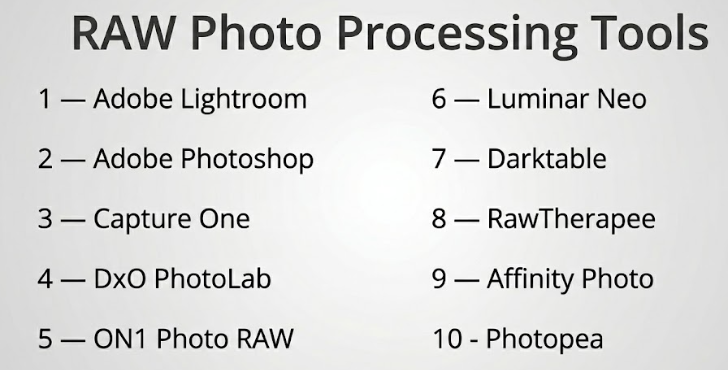
Top 10 RAW Photo Processing Tools Tools
#1 — Adobe Lightroom
Short description: A widely adopted RAW photo editor offering a balance of powerful editing tools and intuitive workflow management, suitable for beginners to professionals.
Key Features
- Advanced RAW editing controls
- AI-powered masking and subject detection
- Cloud synchronization across devices
- Presets and batch editing
- Integrated photo cataloging
- Mobile editing capabilities
Pros
- Easy to learn yet powerful
- Strong ecosystem integration
Cons
- Subscription-only pricing
- Limited deep pixel-level editing
Platforms / Deployment
Windows / macOS / iOS / Android / Cloud
Security & Compliance
SSO and MFA supported; others not publicly stated
Integrations & Ecosystem
Lightroom integrates tightly with broader creative workflows, especially within its native ecosystem.
- Integration with Photoshop
- Cloud storage sync
- Preset marketplaces
- Mobile ecosystem
Support & Community
Extensive documentation, tutorials, and one of the largest photography communities globally.
#2 — Adobe Photoshop
Short description: Industry-standard image editing software with advanced RAW processing via its Camera Raw engine, ideal for detailed and complex edits.
Key Features
- Camera Raw integration
- Layer-based editing
- Advanced retouching tools
- AI-powered enhancements
- Extensive plugin support
Pros
- Extremely powerful editing capabilities
- Industry-standard workflows
Cons
- Steep learning curve
- Subscription-based pricing
Platforms / Deployment
Windows / macOS
Security & Compliance
SSO, MFA; others not publicly stated
Integrations & Ecosystem
- Integration with Lightroom
- Third-party plugins
- Design and publishing tools
Support & Community
Massive global community with extensive learning resources.
#3 — Capture One
Short description: Professional-grade RAW processor known for exceptional color grading and tethered shooting, widely used in studio environments.
Key Features
- Advanced color grading tools
- Tethered shooting support
- Layer-based adjustments
- Customizable interface
- High-performance processing
Pros
- Excellent color accuracy
- Strong studio workflow support
Cons
- Higher cost
- Steeper learning curve
Platforms / Deployment
Windows / macOS
Security & Compliance
Not publicly stated
Integrations & Ecosystem
- Camera integrations
- Studio workflow tools
- Plugin support
- Export integrations
Support & Community
Professional-focused support and active user base.
#4 — DxO PhotoLab
Short description: A RAW editor focused on delivering superior image quality through advanced optical corrections and AI noise reduction.
Key Features
- AI-based noise reduction
- Optical corrections database
- Smart lighting adjustments
- Local editing tools
- Batch processing
Pros
- Outstanding noise reduction
- High image quality output
Cons
- Limited asset management features
- Smaller ecosystem
Platforms / Deployment
Windows / macOS
Security & Compliance
Not publicly stated
Integrations & Ecosystem
- Plugin support
- Camera/lens database
- Export workflows
Support & Community
Moderate documentation and niche professional community.
#5 — ON1 Photo RAW
Short description: An all-in-one photo editing platform combining RAW processing, effects, and asset management without requiring a subscription.
Key Features
- Non-destructive editing
- Built-in effects and presets
- AI-powered tools
- Photo organization system
- Layer support
Pros
- No mandatory subscription
- Comprehensive feature set
Cons
- Performance inconsistencies
- Complex interface
Platforms / Deployment
Windows / macOS
Security & Compliance
Not publicly stated
Integrations & Ecosystem
- Plugin compatibility
- Preset marketplace
- Limited cloud sync
Support & Community
Active community with solid tutorial resources.
#6 — Luminar Neo
Short description: AI-focused photo editing software designed for fast and automated enhancements, ideal for beginners and content creators.
Key Features
- AI sky replacement
- Portrait enhancement tools
- Background removal
- Layer-based editing
- Preset-driven workflow
Pros
- Beginner-friendly interface
- Powerful AI features
Cons
- Limited manual control depth
- Occasional performance issues
Platforms / Deployment
Windows / macOS
Security & Compliance
Not publicly stated
Integrations & Ecosystem
- Plugin support for other editors
- Extension marketplace
- Limited cloud features
Support & Community
Strong onboarding resources and growing community.
#7 — Darktable
Short description: A free, open-source RAW processing tool offering advanced editing capabilities and customizable workflows.
Key Features
- Non-destructive editing
- Advanced color management
- Tethered shooting
- Scriptable workflows
- Extensive editing modules
Pros
- Completely free and open-source
- Highly customizable
Cons
- Complex interface
- Steep learning curve
Platforms / Deployment
Windows / macOS / Linux
Security & Compliance
Not publicly stated
Integrations & Ecosystem
- Open-source plugins
- Script-based extensions
- Export tools
Support & Community
Strong open-source community and active forums.
#8 — RawTherapee
Short description: A powerful open-source RAW editor focused on high-quality image processing and fine control over image parameters.
Key Features
- Advanced demosaicing algorithms
- High bit-depth processing
- Batch editing
- Color correction tools
- Non-destructive workflow
Pros
- High-quality output
- Free to use
Cons
- Outdated interface
- Limited workflow management
Platforms / Deployment
Windows / macOS / Linux
Security & Compliance
Not publicly stated
Integrations & Ecosystem
- Script support
- Export pipelines
- Open-source ecosystem
Support & Community
Active but smaller community compared to commercial tools.
#9 — Affinity Photo
Short description: A professional photo editing tool offering strong RAW development features with a one-time purchase model.
Key Features
- Dedicated RAW processing mode
- Layer-based editing
- HDR merging
- Panorama stitching
- Advanced retouching tools
Pros
- No subscription required
- Powerful editing features
Cons
- Limited asset management
- Smaller plugin ecosystem
Platforms / Deployment
Windows / macOS / iOS
Security & Compliance
Not publicly stated
Integrations & Ecosystem
- Plugin compatibility
- File format support
- Design ecosystem integration
Support & Community
Growing community with solid documentation.
#10 — Photopea
Short description: A browser-based image editor supporting RAW files and offering a familiar interface for users transitioning from desktop tools.
Key Features
- Web-based editing
- RAW file support
- Layer-based editing
- PSD compatibility
- No installation required
Pros
- Accessible from any device
- Free tier available
Cons
- Limited performance for large files
- Requires stable internet connection
Platforms / Deployment
Web (Cloud)
Security & Compliance
Not publicly stated
Integrations & Ecosystem
- Cloud storage imports
- File format compatibility
- Browser-based workflow
Support & Community
Moderate documentation and growing user base.
Comparison Table (Top 10)
| Tool Name | Best For | Platform(s) Supported | Deployment | Standout Feature | Public Rating |
|---|---|---|---|---|---|
| Adobe Lightroom | Photographers | Win/macOS/iOS/Android | Cloud/Hybrid | AI editing + cloud sync | N/A |
| Adobe Photoshop | Advanced editing | Win/macOS | Desktop | Layer-based editing | N/A |
| Capture One | Studio professionals | Win/macOS | Desktop | Tethered shooting | N/A |
| DxO PhotoLab | Image quality focus | Win/macOS | Desktop | AI noise reduction | N/A |
| ON1 Photo RAW | All-in-one editing | Win/macOS | Desktop | Built-in effects | N/A |
| Luminar Neo | AI-based editing | Win/macOS | Desktop | Automation tools | N/A |
| Darktable | Open-source users | Win/macOS/Linux | Desktop | Custom workflows | N/A |
| RawTherapee | Advanced processing | Win/macOS/Linux | Desktop | High bit-depth editing | N/A |
| Affinity Photo | Budget professionals | Win/macOS/iOS | Desktop | One-time pricing | N/A |
| Photopea | Web-based editing | Web | Cloud | Browser access | N/A |
Evaluation & Scoring of RAW Photo Processing Tools
| Tool Name | Core | Ease | Integrations | Security | Performance | Support | Value | Weighted Total |
|---|---|---|---|---|---|---|---|---|
| Adobe Lightroom | 9 | 9 | 9 | 8 | 9 | 9 | 8 | 8.8 |
| Adobe Photoshop | 10 | 7 | 10 | 8 | 9 | 10 | 7 | 8.7 |
| Capture One | 9 | 7 | 8 | 7 | 9 | 8 | 7 | 8.1 |
| DxO PhotoLab | 8 | 8 | 7 | 7 | 9 | 7 | 8 | 7.9 |
| ON1 Photo RAW | 8 | 7 | 7 | 6 | 7 | 7 | 8 | 7.4 |
| Luminar Neo | 7 | 9 | 6 | 6 | 7 | 7 | 7 | 7.2 |
| Darktable | 8 | 6 | 6 | 6 | 7 | 8 | 9 | 7.1 |
| RawTherapee | 8 | 6 | 5 | 6 | 7 | 7 | 9 | 7.0 |
| Affinity Photo | 9 | 8 | 7 | 6 | 8 | 7 | 9 | 8.0 |
| Photopea | 6 | 8 | 6 | 6 | 6 | 6 | 8 | 6.8 |
How to interpret:
- These scores are relative comparisons, not absolute benchmarks.
- A higher total indicates a better overall balance across criteria.
- Core features and usability carry the most weight.
- Value reflects pricing relative to capabilities.
- Always align scores with your specific workflow needs before deciding.
Which RAW Photo Processing Tools Tool Is Right for You?
Solo / Freelancer
- Best choices: Lightroom, Luminar Neo
- Focus on ease of use, speed, and minimal setup.
SMB
- Best choices: ON1 Photo RAW, Affinity Photo
- Balance between cost and feature depth.
Mid-Market
- Best choices: Capture One, DxO PhotoLab
- Advanced features and better performance for teams.
Enterprise
- Best choice: Adobe ecosystem
- Strong integration, scalability, and collaboration tools.
Budget vs Premium
- Budget: Darktable, RawTherapee
- Premium: Adobe tools, Capture One
Feature Depth vs Ease of Use
- Deep control: Photoshop, Capture One
- Ease of use: Lightroom, Luminar Neo
Integrations & Scalability
- Strongest: Adobe ecosystem
- Moderate: ON1, Luminar
Security & Compliance Needs
- Enterprise users should prioritize tools with SSO and MFA support
- Open-source tools may lack formal compliance certifications
Frequently Asked Questions (FAQs)
What is a RAW photo file?
A RAW file is an unprocessed image that contains full sensor data, allowing maximum flexibility in editing.
Are RAW tools necessary for beginners?
Not always, but beginner-friendly tools can help improve editing quality significantly.
What is non-destructive editing?
It allows you to edit images without permanently altering the original file.
Do all tools support every camera format?
Most support major brands, but compatibility may vary.
Are free RAW editors good enough?
Yes, for many users, but they may lack advanced features or polished interfaces.
Is cloud-based editing better?
It depends on your workflow; cloud tools are better for collaboration and mobility.
How important is GPU support?
Very important for handling large files and AI-based features efficiently.
Can I switch between tools easily?
Switching is possible, but workflows and presets may not transfer seamlessly.
What are common mistakes when choosing a tool?
Ignoring workflow needs, overpaying for unused features, and underestimating performance requirements.
Are these tools secure for enterprise use?
Some offer enterprise-grade security features, but many do not publicly disclose full compliance details.
Conclusion
RAW photo processing tools have become essential for modern photography and content creation workflows. From AI-driven automation to advanced manual controls, the market offers a wide range of options tailored to different needs and skill levels.
There is no one-size-fits-all solution. The best tool depends on your workflow, budget, and required level of control.