Introduction
Knowledge Base Software helps organizations create, manage, and share information in a structured, searchable format. It is commonly used for internal documentation, customer support self-service portals, FAQs, and training materials. In simple terms, it ensures that knowledge is accessible, organized, and reusable.
As businesses scale and customer expectations rise, knowledge base tools have become essential. Users expect instant answers without contacting support, while teams need a centralized system to document processes and reduce repetitive work. Modern platforms now include AI-powered search, automation, and integrations, making them far more powerful than traditional documentation systems.
Common use cases:
- Customer self-service help centers
- Internal company wikis and documentation
- Product documentation and developer guides
- Employee onboarding and training resources
- Support team knowledge management
What buyers should evaluate:
- Ease of content creation and editing
- Search functionality and AI capabilities
- Customization and branding options
- Access control and permissions
- Integration with support tools and CRMs
- Scalability for growing content
- Analytics and reporting features
- Collaboration and workflow management
- Deployment flexibility (cloud or self-hosted)
Best for: Customer support teams, SaaS companies, IT departments, HR teams, and organizations managing large volumes of documentation or customer queries.
Not ideal for: Small teams with minimal documentation needs, businesses requiring only simple note-taking tools, or organizations without structured content workflows.
Key Trends in Knowledge Base Software
- AI-powered search and answers: Natural language queries with instant, context-aware responses.
- Automated content generation: AI-assisted article creation, summaries, and updates.
- Headless knowledge bases: API-first platforms for delivering content across apps and channels.
- Self-service optimization: Reducing support tickets through smarter help centers.
- Embedded knowledge: Knowledge bases integrated directly into apps and workflows.
- Multilingual support: Real-time translation for global audiences.
- Analytics-driven improvements: Insights into content gaps and user behavior.
- Low-code/no-code editing: Enabling non-technical teams to manage content easily.
- Stronger security controls: Role-based access, audit logs, and compliance features.
- Omnichannel delivery: Content accessible via web, chatbots, and mobile apps.
How We Selected These Tools (Methodology)
- Evaluated market adoption and brand recognition
- Assessed core knowledge management capabilities
- Reviewed ease of use for non-technical users
- Considered search performance and AI features
- Analyzed integration capabilities with support tools
- Included tools for SMBs, mid-market, and enterprise
- Evaluated scalability and performance
- Reviewed security features and access controls
- Considered community support and documentation quality
- Balanced cloud and self-hosted options
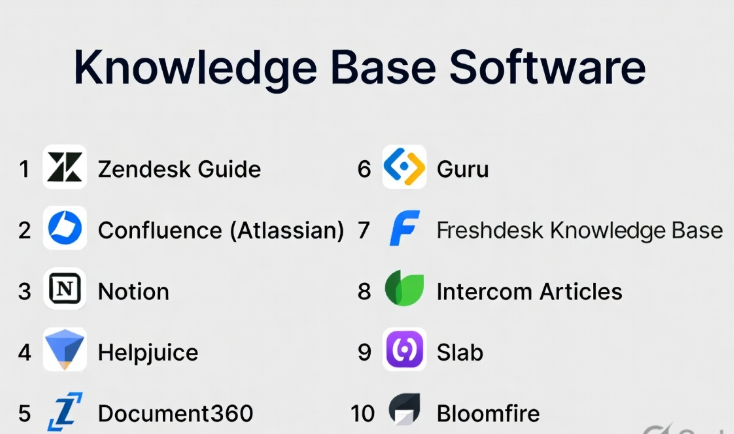
Top 10 Knowledge Base Software Tools
#1 — Zendesk Guide
Short description: A knowledge base solution integrated with Zendesk’s customer support platform, ideal for support teams and enterprises.
Key Features
- Help center and knowledge base creation
- AI-powered content suggestions
- Integration with Zendesk Support
- Customizable themes and branding
- Content workflows and approvals
- Multilingual support
- Analytics and reporting
Pros
- Seamless integration with support tools
- Strong analytics and reporting
- Scalable for enterprise use
Cons
- Requires Zendesk ecosystem for full value
- Pricing can be high
- Limited standalone usage
Platforms / Deployment
Web / Cloud
Security & Compliance
SSO, RBAC, encryption; Compliance: Not publicly stated
Integrations & Ecosystem
Deep integration with customer support and CRM systems.
- Zendesk Suite
- CRM tools
- APIs
- Chat and ticketing systems
Support & Community
Strong documentation and enterprise support; large user base.
#2 — Confluence
Short description: A popular team collaboration and knowledge base tool used for internal documentation and project management.
Key Features
- Team collaboration spaces
- Rich text editor and templates
- Integration with Jira
- Version control
- Permissions and access control
- Search functionality
- Content organization
Pros
- Excellent for internal documentation
- Strong integration with Atlassian tools
- Easy collaboration
Cons
- Not ideal for external knowledge bases
- UI can become cluttered
- Requires setup for structure
Platforms / Deployment
Web / Cloud / Self-hosted
Security & Compliance
SSO, RBAC; Compliance: Not publicly stated
Integrations & Ecosystem
Part of Atlassian ecosystem.
- Jira
- Trello
- APIs
- Plugins
Support & Community
Large global community; extensive documentation.
#3 — Notion
Short description: A flexible workspace that combines note-taking, databases, and knowledge management.
Key Features
- Customizable pages and databases
- Templates and content blocks
- Collaboration tools
- Search and organization
- API access
- Cross-platform support
Pros
- Highly flexible and customizable
- Easy to use
- Great for small teams
Cons
- Limited advanced knowledge base features
- Scaling challenges
- Permissions can be basic
Platforms / Deployment
Web / Windows / macOS / iOS / Android / Cloud
Security & Compliance
Encryption; Compliance: Not publicly stated
Integrations & Ecosystem
Growing ecosystem with integrations.
- Slack
- APIs
- Third-party tools
Support & Community
Strong community; good documentation.
#4 — Helpjuice
Short description: A dedicated knowledge base platform focused on customer support and self-service.
Key Features
- Advanced search functionality
- Customizable design
- Analytics and insights
- Collaboration tools
- Version control
- Multi-language support
Pros
- Strong search capabilities
- Easy customization
- Good analytics
Cons
- Limited integrations
- Pricing not transparent
- Smaller ecosystem
Platforms / Deployment
Web / Cloud
Security & Compliance
Encryption; Compliance: Not publicly stated
Integrations & Ecosystem
Basic integration capabilities.
- APIs
- CRM tools
- Support platforms
Support & Community
Responsive support; smaller community.
#5 — Document360
Short description: A modern knowledge base tool designed for SaaS companies and support teams.
Key Features
- Markdown editor
- Category management
- Version control
- Analytics
- Custom branding
- API access
- Multi-language support
Pros
- Clean UI
- Easy to manage content
- Good for SaaS companies
Cons
- Limited advanced customization
- Pricing tiers can restrict features
- Smaller ecosystem
Platforms / Deployment
Web / Cloud
Security & Compliance
SSO, encryption; Compliance: Not publicly stated
Integrations & Ecosystem
Moderate integrations.
- CRM tools
- Analytics platforms
- APIs
Support & Community
Good support; growing community.
#6 — Guru
Short description: A knowledge management tool focused on delivering knowledge within workflows.
Key Features
- Browser extension knowledge access
- AI-powered suggestions
- Verification workflows
- Slack integration
- Analytics
- Content organization
Pros
- Great for real-time knowledge access
- Strong integrations
- Easy adoption
Cons
- Limited standalone knowledge base features
- Requires integrations
- Not ideal for public help centers
Platforms / Deployment
Web / Cloud
Security & Compliance
SSO, encryption; Compliance: Not publicly stated
Integrations & Ecosystem
Strong integrations with workplace tools.
- Slack
- CRM systems
- Browser extensions
- APIs
Support & Community
Good support; active user base.
#7 — Freshdesk Knowledge Base
Short description: Part of Freshdesk’s support suite, offering help center and knowledge base features.
Key Features
- Help center creation
- Ticket integration
- Automation workflows
- Analytics
- Multilingual support
- Customization
Pros
- Affordable pricing
- Easy to use
- Integrated with support tools
Cons
- Limited advanced features
- Customization constraints
- Best within Freshdesk ecosystem
Platforms / Deployment
Web / Cloud
Security & Compliance
SSO, encryption; Compliance: Not publicly stated
Integrations & Ecosystem
Part of Freshworks ecosystem.
- CRM tools
- Support tools
- APIs
Support & Community
Good support; growing community.
#8 — Intercom Articles
Short description: A knowledge base solution integrated with Intercom’s messaging platform.
Key Features
- Help center creation
- AI chatbot integration
- Content targeting
- Analytics
- Multilingual support
- Customization
Pros
- Strong chatbot integration
- Great for customer support
- Good UX
Cons
- Requires Intercom ecosystem
- Pricing can be high
- Limited standalone use
Platforms / Deployment
Web / Cloud
Security & Compliance
SSO, encryption; Compliance: Not publicly stated
Integrations & Ecosystem
Integrated with Intercom platform.
- Messaging tools
- CRM
- APIs
Support & Community
Strong support; enterprise focus.
#9 — Slab
Short description: A modern knowledge base tool focused on simplicity and team collaboration.
Key Features
- Clean editor
- Search functionality
- Integrations
- Version history
- Collaboration tools
- Analytics
Pros
- Simple and intuitive
- Good integrations
- Fast setup
Cons
- Limited advanced features
- Not ideal for large enterprises
- Smaller ecosystem
Platforms / Deployment
Web / Cloud
Security & Compliance
Encryption; Compliance: Not publicly stated
Integrations & Ecosystem
Integration-friendly.
- Slack
- GitHub
- APIs
Support & Community
Good documentation; smaller community.
#10 — Bloomfire
Short description: A knowledge sharing platform designed for enterprises and large teams.
Key Features
- Centralized knowledge hub
- AI-powered search
- Multimedia content support
- Analytics
- Collaboration tools
- Access control
Pros
- Strong enterprise features
- Good search functionality
- Scalable
Cons
- Higher pricing
- Complex setup
- Overkill for small teams
Platforms / Deployment
Web / Cloud
Security & Compliance
SSO, encryption; Compliance: Not publicly stated
Integrations & Ecosystem
Enterprise integrations.
- CRM systems
- APIs
- Analytics tools
Support & Community
Enterprise support; moderate community.
Comparison Table (Top 10)
| Tool Name | Best For | Platform(s) Supported | Deployment | Standout Feature | Public Rating |
|---|---|---|---|---|---|
| Zendesk Guide | Support teams | Web | Cloud | Ticket integration | N/A |
| Confluence | Internal teams | Web | Hybrid | Collaboration | N/A |
| Notion | Small teams | Multi-platform | Cloud | Flexibility | N/A |
| Helpjuice | Help centers | Web | Cloud | Search | N/A |
| Document360 | SaaS companies | Web | Cloud | Clean UI | N/A |
| Guru | Workflow knowledge | Web | Cloud | Real-time access | N/A |
| Freshdesk KB | SMB support | Web | Cloud | Affordable | N/A |
| Intercom Articles | Customer support | Web | Cloud | Chatbot integration | N/A |
| Slab | Teams | Web | Cloud | Simplicity | N/A |
| Bloomfire | Enterprise | Web | Cloud | Knowledge hub | N/A |
Evaluation & Scoring of Knowledge Base Software
| Tool Name | Core (25%) | Ease (15%) | Integrations (15%) | Security (10%) | Performance (10%) | Support (10%) | Value (15%) | Weighted Total |
|---|---|---|---|---|---|---|---|---|
| Zendesk Guide | 9 | 7 | 9 | 8 | 8 | 8 | 6 | 8.0 |
| Confluence | 8 | 7 | 9 | 8 | 8 | 8 | 7 | 7.9 |
| Notion | 7 | 9 | 7 | 7 | 7 | 7 | 8 | 7.6 |
| Helpjuice | 8 | 8 | 6 | 7 | 7 | 7 | 7 | 7.4 |
| Document360 | 8 | 8 | 7 | 7 | 7 | 7 | 7 | 7.5 |
| Guru | 8 | 9 | 8 | 7 | 8 | 7 | 7 | 7.9 |
| Freshdesk KB | 7 | 8 | 7 | 7 | 7 | 7 | 8 | 7.5 |
| Intercom Articles | 8 | 8 | 8 | 7 | 8 | 8 | 6 | 7.8 |
| Slab | 7 | 9 | 7 | 7 | 7 | 7 | 8 | 7.6 |
| Bloomfire | 8 | 7 | 7 | 8 | 8 | 8 | 6 | 7.6 |
How to interpret the scores:
- Scores are comparative across tools in this list.
- Higher scores indicate better balance across features and usability.
- Enterprise tools score high in features but lower in cost efficiency.
- Simpler tools score high in ease but may lack advanced capabilities.
- Choose based on your priorities rather than overall score.
Which Knowledge Base Software Is Right for You?
Solo / Freelancer
- Best choices: Notion, Slab
- Focus on simplicity and flexibility.
SMB
- Best choices: Freshdesk KB, Document360
- Balance between cost and usability.
Mid-Market
- Best choices: Guru, Intercom Articles
- Focus on integrations and automation.
Enterprise
- Best choices: Zendesk Guide, Bloomfire, Confluence
- Focus on scalability and security.
Budget vs Premium
- Budget: Notion, Freshdesk
- Premium: Zendesk, Intercom
Feature Depth vs Ease of Use
- Deep features: Zendesk, Bloomfire
- Easy tools: Notion, Slab
Integrations & Scalability
- Strong: Zendesk, Confluence, Intercom
- Moderate: Others
Security & Compliance Needs
- Enterprise-grade: Zendesk, Confluence
- Moderate: Others
Frequently Asked Questions (FAQs)
What is knowledge base software?
It is a tool for creating and managing structured documentation for users or teams.
Is it only for customer support?
No, it is also used for internal documentation and training.
Can I use it for free?
Some tools offer free plans, but advanced features require paid plans.
How long does setup take?
Basic setup can take hours; full implementation may take weeks.
Does it support AI?
Many modern tools include AI for search and content suggestions.
Can it integrate with CRM tools?
Yes, most tools support CRM and support system integrations.
Is it secure?
Security varies; enterprise tools offer stronger controls.
Can I migrate from one tool to another?
Yes, but migration can require planning and resources.
What is the difference from wiki tools?
Knowledge bases are more structured and user-focused than wikis.
Do I need technical skills?
Most tools are designed for non-technical users.
Conclusion
Knowledge Base Software plays a critical role in improving customer support, internal collaboration, and information accessibility. While enterprise solutions like Zendesk and Bloomfire offer advanced capabilities, tools like Notion and Document360 provide simplicity and flexibility for smaller teams.