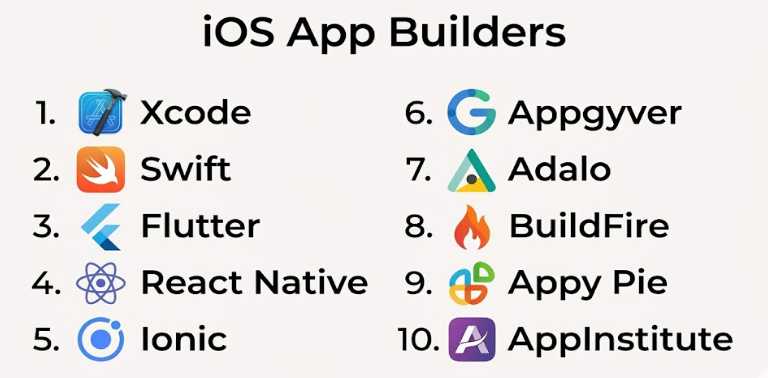
Introduction
iOS app builders are platforms and development tools used to create applications for Apple devices such as iPhones and iPads. These tools range from no-code builders for beginners to advanced development environments used by professional developers.
With Apple’s ecosystem known for premium users, strong security, and high monetization potential, building iOS apps has become a strategic priority for businesses, startups, and developers. Modern iOS app builders enable faster development cycles, better UI/UX design, and seamless integration with Apple services.
Common use cases include:
- Business and productivity apps
- E-commerce mobile apps
- Subscription-based platforms
- Media and content apps
- On-demand service apps
- MVPs for startups
What buyers should evaluate:
- Native vs cross-platform capabilities
- Ease of use and learning curve
- UI/UX design flexibility
- Integration with Apple ecosystem (e.g., iCloud, Apple Pay)
- Performance and responsiveness
- App Store deployment support
- Security and compliance (Apple guidelines)
- Backend and database support
- Pricing and scalability
- Long-term maintainability
Best for: Developers, startups, and businesses targeting premium mobile users.
Not ideal for: Android-only strategies or users looking for extremely low-cost development with minimal customization.
Key Trends in iOS App Builders
- Swift-first development: Apple’s preferred programming language
- Cross-platform frameworks: Reduce development time and cost
- No-code/low-code growth: Faster app creation for non-developers
- AI-assisted development: Automating UI and workflows
- Cloud-based development: Browser-based app building tools
- Focus on UI/UX excellence: High-quality app design expectations
- Strong security standards: App Store compliance requirements
- Integration with Apple services: iCloud, Siri, Apple Pay
- App monetization models: Subscriptions and in-app purchases
- Rapid prototyping tools: Faster MVP development
How We Selected These Tools (Methodology)
We evaluated tools based on:
- Popularity among iOS developers
- Feature depth and flexibility
- Ease of use for beginners vs professionals
- Performance and app quality
- Integration with Apple ecosystem
- App Store publishing support
- Pricing and value
- Scalability and long-term viability
- Community support and documentation
- Innovation and development speed
Top 10 iOS App Builders
#1 — Xcode
Short description: Apple’s official IDE for building native iOS applications.
Key Features
- Full iOS SDK access
- Interface Builder for UI design
- Swift and Objective-C support
- Simulator for testing
- Debugging and performance tools
Pros
- Native performance
- Full control over app development
- Official Apple support
Cons
- Mac-only
- Steep learning curve
Platforms / Deployment
iOS
Security & Compliance
High — meets Apple’s strict standards
Integrations & Ecosystem
- Apple services (iCloud, Apple Pay)
- APIs
- Third-party libraries
Support & Community
Very large developer community.
#2 — Swift (with iOS SDK)
Short description: Apple’s modern programming language for building high-performance iOS apps.
Key Features
- Clean syntax
- High performance
- Strong typing
- Full iOS SDK access
- Safe memory management
Pros
- Official Apple language
- Efficient and fast
- Secure
Cons
- Requires coding knowledge
- iOS-focused
Platforms / Deployment
iOS
Security & Compliance
High
Integrations & Ecosystem
- Apple frameworks
- APIs
Support & Community
Strong ecosystem.
#3 — Flutter
Short description: A cross-platform framework for building iOS apps from a single codebase.
Key Features
- Single codebase
- Rich UI components
- Hot reload
- Native-like performance
- Strong plugin ecosystem
Pros
- Fast development
- Cross-platform
- High performance
Cons
- Larger app size
- Learning Dart
Platforms / Deployment
iOS / Android / Web
Security & Compliance
Depends on implementation
Integrations & Ecosystem
- Firebase
- APIs
- Plugins
Support & Community
Large and active community.
#4 — React Native
Short description: A JavaScript framework for building iOS apps using reusable components.
Key Features
- Component-based architecture
- Cross-platform support
- Live reload
- Native module integration
- Large ecosystem
Pros
- Popular and widely used
- Faster development
- Large talent pool
Cons
- Performance limitations
- Debugging complexity
Platforms / Deployment
iOS / Android
Security & Compliance
Depends on implementation
Integrations & Ecosystem
- APIs
- Libraries
- Backend services
Support & Community
Very active community.
#5 — Ionic
Short description: A web-based framework for building iOS apps using HTML, CSS, and JavaScript.
Key Features
- Web technologies
- UI components
- Cross-platform support
- PWA support
- Plugin integrations
Pros
- Easy for web developers
- Fast development
- Cross-platform
Cons
- Less native feel
- Performance trade-offs
Platforms / Deployment
iOS / Android / Web
Security & Compliance
Depends on implementation
Integrations & Ecosystem
- APIs
- Plugins
Support & Community
Strong community.
#6 — Thunkable
Short description: A no-code platform for building iOS apps visually.
Key Features
- Drag-and-drop interface
- Logic blocks
- Real-time preview
- API integrations
- Cross-platform support
Pros
- Beginner-friendly
- No coding required
- Fast development
Cons
- Limited customization
- Performance constraints
Platforms / Deployment
iOS / Android
Security & Compliance
Not publicly stated
Integrations & Ecosystem
- APIs
- External services
Support & Community
Active learning resources.
#7 — Appgyver
Short description: A no-code/low-code platform for building advanced iOS apps.
Key Features
- Visual builder
- Logic flows
- Data integration
- Enterprise capabilities
- Responsive UI
Pros
- Powerful no-code tool
- Flexible logic
- Scalable
Cons
- Learning curve for advanced features
- Platform complexity
Platforms / Deployment
iOS / Android / Web
Security & Compliance
Moderate
Integrations & Ecosystem
- APIs
- Backend systems
Support & Community
Growing community.
#8 — Adalo
Short description: A no-code app builder focused on UI-driven iOS app creation.
Key Features
- Drag-and-drop builder
- Built-in database
- Custom actions
- Templates
- Publishing support
Pros
- Easy to use
- Great for MVPs
- Fast prototyping
Cons
- Limited scalability
- Performance issues for complex apps
Platforms / Deployment
iOS / Android
Security & Compliance
Moderate
Integrations & Ecosystem
- APIs
- Integrations
Support & Community
Active community.
#9 — BuildFire
Short description: A modular no-code app builder with plugin support.
Key Features
- Plugin marketplace
- Drag-and-drop builder
- Custom functionality
- Analytics
- Publishing tools
Pros
- Easy to use
- Extendable via plugins
- Fast deployment
Cons
- Limited deep customization
- Platform dependency
Platforms / Deployment
iOS / Android
Security & Compliance
Moderate
Integrations & Ecosystem
- Plugins
- APIs
Support & Community
Good documentation.
#10 — Appy Pie
Short description: A beginner-friendly no-code platform for building iOS apps quickly.
Key Features
- Templates
- Drag-and-drop builder
- Push notifications
- Monetization tools
- App publishing
Pros
- Very easy to use
- No coding required
- Fast setup
Cons
- Limited customization
- Subscription pricing
Platforms / Deployment
iOS / Android
Security & Compliance
Not publicly stated
Integrations & Ecosystem
- APIs
- Plugins
Support & Community
Good support resources.
Comparison Table (Top 10)
| Tool Name | Best For | Platform(s) Supported | Deployment | Standout Feature | Public Rating |
|---|---|---|---|---|---|
| Xcode | Native iOS apps | iOS | Self-hosted | Official Apple IDE | N/A |
| Swift | Native development | iOS | Self-hosted | Modern language | N/A |
| Flutter | Cross-platform | iOS, Android, Web | Self-hosted | Single codebase | N/A |
| React Native | JS developers | iOS, Android | Self-hosted | Large ecosystem | N/A |
| Ionic | Web developers | iOS, Android, Web | Self-hosted | Web technologies | N/A |
| Thunkable | No-code apps | iOS, Android | Cloud | Visual builder | N/A |
| Appgyver | Advanced no-code | iOS, Android, Web | Cloud | Logic flows | N/A |
| Adalo | MVPs | iOS, Android | Cloud | Built-in database | N/A |
| BuildFire | Modular apps | iOS, Android | Cloud | Plugin marketplace | N/A |
| Appy Pie | Beginners | iOS, Android | Cloud | Templates | N/A |
Evaluation & Scoring of iOS App Builders
| Tool Name | Core | Ease | Integrations | Security | Performance | Support | Value | Weighted Total |
|---|---|---|---|---|---|---|---|---|
| Xcode | 10 | 5 | 9 | 10 | 10 | 9 | 8 | 8.7 |
| Swift | 9 | 6 | 8 | 10 | 10 | 8 | 8 | 8.4 |
| Flutter | 9 | 7 | 8 | 8 | 9 | 9 | 9 | 8.6 |
| React Native | 9 | 8 | 9 | 7 | 8 | 9 | 9 | 8.4 |
| Ionic | 7 | 9 | 8 | 7 | 7 | 8 | 8 | 7.7 |
| Thunkable | 7 | 9 | 7 | 6 | 7 | 7 | 8 | 7.4 |
| Appgyver | 8 | 7 | 8 | 7 | 8 | 7 | 8 | 7.6 |
| Adalo | 7 | 9 | 7 | 6 | 7 | 7 | 8 | 7.4 |
| BuildFire | 7 | 9 | 7 | 6 | 7 | 7 | 8 | 7.4 |
| Appy Pie | 6 | 10 | 6 | 6 | 6 | 7 | 7 | 7.0 |
Which iOS App Builder Is Right for You?
Solo / Freelancer
- Best: Thunkable, Adalo, Appy Pie
SMB
- Best: BuildFire, Ionic
Mid-Market
- Best: Flutter, React Native
Enterprise
- Best: Xcode, Swift
Budget vs Premium
- Budget: Thunkable, Appy Pie
- Premium: BuildFire
Feature Depth vs Ease of Use
- Deep: Xcode, Swift
- Easy: Adalo, Appy Pie
Integrations & Scalability
- Strong: Flutter, React Native
- Moderate: Ionic
Security & Compliance Needs
- Highest: Xcode, Swift
- Moderate: Flutter
Frequently Asked Questions (FAQs)
What is an iOS app builder?
A tool used to create apps for Apple devices like iPhones and iPads.
Do I need coding knowledge?
Not always—no-code platforms allow app creation without coding.
Which tool is best for beginners?
Thunkable, Adalo, and Appy Pie are great for beginners.
Can I publish apps on the App Store?
Yes, most tools support App Store deployment.
Which tool offers best performance?
Xcode and Swift provide the best native performance.
Are no-code tools scalable?
They work best for simple to mid-level apps.
Can I build cross-platform apps?
Yes, tools like Flutter and React Native support both iOS and Android.
Are these tools secure?
Native tools offer the highest security, others depend on implementation.
What is the most flexible tool?
Xcode offers maximum flexibility.
How much do these tools cost?
They range from free to subscription-based pricing.
Conclusion
iOS app builders provide a wide spectrum of options—from powerful native tools like Xcode and Swift to beginner-friendly no-code platforms like Appy Pie and Adalo.
Your choice depends on your technical skills, budget, and app complexity. Native tools are ideal for performance and control, while no-code platforms enable faster time-to-market.