Introduction
Desktop publishing (DTP) software enables users to design and produce visually rich documents by combining text, images, and layout elements with precision. Unlike basic word processors, DTP tools provide advanced control over typography, page layout, color management, and print-ready output—making them essential for professional publishing workflows.
Modern desktop publishing tools have evolved to support digital-first content, collaborative workflows, and integration with design ecosystems. Whether creating magazines, brochures, eBooks, or marketing collateral, these tools help ensure consistency, quality, and scalability.
Common use cases include:
- Magazine, newspaper, and book publishing
- Brochure, flyer, and marketing material design
- Corporate reports and presentations
- eBook and digital publication creation
- Catalogs and product documentation
What buyers should evaluate:
- Page layout precision and typography controls
- Master pages, templates, and style systems
- Export formats (PDF, EPUB, print-ready files)
- Integration with design and image editing tools
- Collaboration and version control features
- Performance with large documents
- Platform compatibility (desktop, cloud)
- Asset and font management
- Pricing model and licensing
Best for: Publishers, graphic designers, marketing teams, print houses, and businesses producing high-quality documents at scale.
Not ideal for: Users creating simple documents or text-heavy content; standard word processors or presentation tools may be more suitable.
Key Trends in Desktop Publishing Software
- Digital-first publishing workflows: Growing focus on interactive PDFs and eBooks.
- Cloud collaboration: Real-time editing and shared asset libraries.
- AI-assisted layout design: Automated text flow, layout suggestions, and formatting.
- Cross-platform publishing: Support for print, web, and mobile outputs.
- Integration with design ecosystems: Seamless workflows with illustration and photo editing tools.
- Improved typography engines: Advanced font handling and multilingual support.
- Template-driven design systems: Faster production using reusable layouts.
- Subscription-based licensing: Increasing shift from perpetual licenses.
- Performance optimization: Handling large documents with complex layouts more efficiently.
How We Selected These Tools (Methodology)
- Evaluated market adoption and industry relevance
- Assessed layout precision and typography capabilities
- Considered performance with large-scale publishing projects
- Reviewed integration with creative and publishing workflows
- Included tools for various user segments (freelancers to enterprises)
- Balanced desktop, cloud, and open-source solutions
- Analyzed community support and documentation quality
- Considered ease of onboarding and usability
- Factored in export flexibility and publishing formats
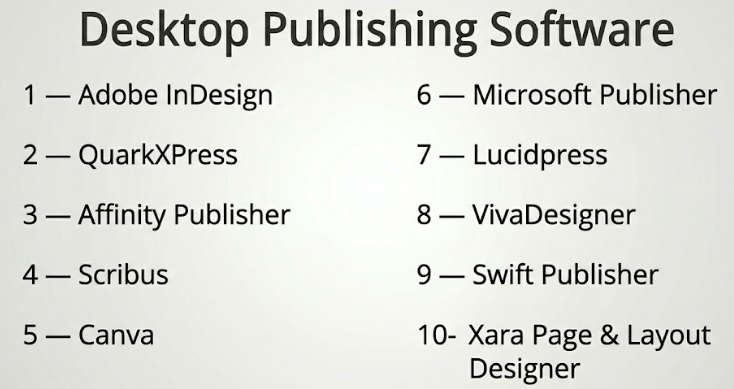
Top 10 Desktop Publishing Software Tools
#1 — Adobe InDesign
Short description: Industry-leading desktop publishing software used for professional print and digital layout design.
Key Features
- Advanced page layout and typography
- Master pages and style systems
- Interactive PDF and EPUB export
- Preflight and print-ready tools
- Integration with design ecosystem
- Asset and font management
Pros
- Industry-standard for publishing
- Extensive feature set
Cons
- Subscription-based pricing
- Learning curve for beginners
Platforms / Deployment
Windows / macOS
Security & Compliance
SSO, MFA; others not publicly stated
Integrations & Ecosystem
Adobe InDesign integrates deeply into professional publishing workflows.
- Integration with Illustrator and Photoshop
- Creative Cloud libraries
- Plugin ecosystem
- Asset management tools
Support & Community
Extensive documentation, tutorials, and a large professional community.
#2 — QuarkXPress
Short description: A long-standing desktop publishing tool known for its powerful layout and typography capabilities.
Key Features
- Advanced typography controls
- Page layout tools
- Digital publishing features
- Responsive design capabilities
- Color management
- Multi-format export
Pros
- Strong print publishing features
- No mandatory subscription
Cons
- Smaller user base
- Less modern ecosystem
Platforms / Deployment
Windows / macOS
Security & Compliance
Not publicly stated
Integrations & Ecosystem
- Publishing tools integration
- Export workflows
- File compatibility
Support & Community
Established but smaller community compared to competitors.
#3 — Affinity Publisher
Short description: A modern desktop publishing tool offering professional features with a one-time purchase model.
Key Features
- StudioLink integration with other tools
- Advanced page layout
- Master pages and templates
- Real-time performance
- Print-ready output
- Typography controls
Pros
- No subscription required
- High performance
Cons
- Smaller plugin ecosystem
- Limited cloud collaboration
Platforms / Deployment
Windows / macOS / iPad
Security & Compliance
Not publicly stated
Integrations & Ecosystem
- Integration with Affinity Designer and Photo
- File compatibility
- Export options
Support & Community
Growing community and strong documentation.
#4 — Scribus
Short description: An open-source desktop publishing tool suitable for creating professional layouts without licensing costs.
Key Features
- Page layout tools
- Color management
- PDF creation
- Scriptable workflows
- Template support
- Print-ready output
Pros
- Free and open-source
- Customizable workflows
Cons
- Outdated interface
- Steeper learning curve
Platforms / Deployment
Windows / macOS / Linux
Security & Compliance
Not publicly stated
Integrations & Ecosystem
- Open-source extensions
- Export tools
- Script integration
Support & Community
Active open-source community with moderate documentation.
#5 — Canva
Short description: A cloud-based design platform with basic desktop publishing capabilities for marketing and business users.
Key Features
- Drag-and-drop editor
- Templates for print and digital
- Collaboration tools
- Asset libraries
- Export options
- Brand kits
Pros
- Extremely easy to use
- Strong collaboration features
Cons
- Limited advanced layout control
- Not ideal for complex publishing
Platforms / Deployment
Web / iOS / Android
Security & Compliance
SSO, MFA; others not publicly stated
Integrations & Ecosystem
- Social media integrations
- Asset libraries
- Template marketplace
Support & Community
Large user base with extensive tutorials.
#6 — Microsoft Publisher
Short description: A beginner-friendly desktop publishing tool designed for simple layouts and small business use.
Key Features
- Templates for brochures and flyers
- Basic layout tools
- Text and image editing
- Print-ready output
- Integration with office tools
Pros
- Easy to use
- Familiar interface
Cons
- Limited advanced features
- Windows-only
Platforms / Deployment
Windows
Security & Compliance
Not publicly stated
Integrations & Ecosystem
- Microsoft Office integration
- File compatibility
- Template ecosystem
Support & Community
Good documentation and widespread familiarity.
#7 — Lucidpress (Marq)
Short description: A cloud-based publishing tool focused on brand consistency and team collaboration.
Key Features
- Brand templates
- Collaboration tools
- Cloud-based editing
- Asset management
- Layout tools
Pros
- Strong brand management
- Easy collaboration
Cons
- Limited advanced typography
- Subscription-based
Platforms / Deployment
Web
Security & Compliance
SSO, MFA; others not publicly stated
Integrations & Ecosystem
- Cloud storage integrations
- Brand asset management
- API support
Support & Community
Moderate documentation and business-focused support.
#8 — VivaDesigner
Short description: A flexible desktop publishing solution supporting both print and digital workflows.
Key Features
- Page layout tools
- Cross-media publishing
- Template support
- Typography controls
- Multi-format export
Pros
- Flexible deployment options
- Cross-platform support
Cons
- Less popular
- Limited ecosystem
Platforms / Deployment
Windows / macOS / Linux / Web
Security & Compliance
Not publicly stated
Integrations & Ecosystem
- Export tools
- Publishing workflows
- File compatibility
Support & Community
Smaller user base with limited resources.
#9 — Swift Publisher
Short description: A macOS-focused desktop publishing tool designed for creating marketing materials and layouts.
Key Features
- Templates and design tools
- Page layout features
- Image editing basics
- Typography tools
- Print support
Pros
- Easy to use
- Affordable
Cons
- macOS only
- Limited advanced features
Platforms / Deployment
macOS
Security & Compliance
Not publicly stated
Integrations & Ecosystem
- Template libraries
- Export tools
- Basic integrations
Support & Community
Moderate documentation and niche user base.
#10 — Xara Page & Layout Designer
Short description: A versatile design tool combining vector illustration and desktop publishing capabilities.
Key Features
- Page layout tools
- Drag-and-drop design
- Typography controls
- Image editing features
- Templates
Pros
- Easy to use
- Versatile functionality
Cons
- Limited enterprise features
- Smaller ecosystem
Platforms / Deployment
Windows
Security & Compliance
Not publicly stated
Integrations & Ecosystem
- Template ecosystem
- Export tools
- Basic integrations
Support & Community
Moderate documentation and community support.
Comparison Table (Top 10)
| Tool Name | Best For | Platform(s) Supported | Deployment | Standout Feature | Public Rating |
|---|---|---|---|---|---|
| Adobe InDesign | Professional publishing | Win/macOS | Desktop | Advanced layout tools | N/A |
| QuarkXPress | Print publishing | Win/macOS | Desktop | Typography control | N/A |
| Affinity Publisher | Budget professionals | Win/macOS/iPad | Desktop | One-time pricing | N/A |
| Scribus | Open-source users | Win/macOS/Linux | Desktop | Free publishing | N/A |
| Canva | Marketing teams | Web/iOS/Android | Cloud | Templates | N/A |
| Microsoft Publisher | Beginners | Windows | Desktop | Ease of use | N/A |
| Lucidpress (Marq) | Team collaboration | Web | Cloud | Brand management | N/A |
| VivaDesigner | Cross-media publishing | Win/macOS/Linux/Web | Hybrid | Multi-format support | N/A |
| Swift Publisher | macOS users | macOS | Desktop | Templates | N/A |
| Xara Page & Layout | Small business design | Windows | Desktop | All-in-one design | N/A |
Evaluation & Scoring of Desktop Publishing Software
| Tool Name | Core | Ease | Integrations | Security | Performance | Support | Value | Weighted Total |
|---|---|---|---|---|---|---|---|---|
| Adobe InDesign | 10 | 7 | 10 | 8 | 9 | 10 | 7 | 8.8 |
| QuarkXPress | 9 | 7 | 8 | 7 | 8 | 8 | 8 | 8.0 |
| Affinity Publisher | 9 | 8 | 7 | 6 | 9 | 7 | 9 | 8.2 |
| Scribus | 7 | 6 | 6 | 6 | 7 | 7 | 10 | 7.2 |
| Canva | 6 | 10 | 7 | 7 | 8 | 9 | 8 | 7.8 |
| Microsoft Publisher | 6 | 9 | 7 | 6 | 7 | 8 | 8 | 7.3 |
| Lucidpress (Marq) | 7 | 9 | 8 | 7 | 7 | 8 | 7 | 7.6 |
| VivaDesigner | 7 | 7 | 6 | 6 | 7 | 6 | 7 | 6.8 |
| Swift Publisher | 6 | 9 | 5 | 6 | 7 | 6 | 8 | 7.0 |
| Xara Page & Layout | 7 | 8 | 6 | 6 | 7 | 6 | 7 | 7.1 |
How to interpret:
- Scores are comparative across tools, not absolute benchmarks.
- Higher scores reflect balanced capabilities across categories.
- Core features and integrations carry the most weight.
- Value reflects pricing relative to features offered.
- Choose based on your specific publishing needs and workflow.
Which Desktop Publishing Software Tool Is Right for You?
Solo / Freelancer
- Best: Affinity Publisher, Canva
- Focus on affordability and ease of use
SMB
- Best: Microsoft Publisher, Xara Page & Layout
- Balance simplicity and functionality
Mid-Market
- Best: QuarkXPress, Affinity Publisher
- Strong layout and print capabilities
Enterprise
- Best: Adobe InDesign
- Advanced features and ecosystem integration
Budget vs Premium
- Budget: Scribus, Canva
- Premium: Adobe InDesign, QuarkXPress
Feature Depth vs Ease of Use
- Deep control: InDesign, QuarkXPress
- Ease: Canva, Microsoft Publisher
Integrations & Scalability
- Strongest: Adobe ecosystem
- Moderate: Lucidpress, Affinity
Security & Compliance Needs
- Enterprise tools offer SSO/MFA
- Open-source tools may lack compliance visibility
Frequently Asked Questions (FAQs)
What is desktop publishing software?
It is software used to design and produce documents with advanced layout and typography.
How is it different from word processors?
DTP tools offer precise control over layout, design, and print output.
Are these tools suitable for beginners?
Some tools like Canva and Publisher are beginner-friendly.
Can I create eBooks with these tools?
Yes, many tools support EPUB and digital publishing formats.
Do I need design skills to use DTP software?
Basic tools are easy to learn, but advanced tools require design knowledge.
Are free tools available?
Yes, Scribus is a popular open-source option.
What formats can I export?
Common formats include PDF, EPUB, and print-ready files.
Is cloud-based publishing better?
It depends on collaboration needs; cloud tools are better for teams.
Can I switch between tools?
Possible, but formatting may not transfer perfectly.
What are common mistakes when choosing software?
Ignoring workflow needs and overpaying for unused features.
Conclusion
Desktop publishing software plays a critical role in creating professional, high-quality documents for print and digital distribution. From advanced layout control to collaborative workflows, these tools support a wide range of publishing needs.
There is no single best solution—the right choice depends on your workflow, budget, and level of expertise.